S.import()
Description:
Retrieve contents from strings as records and return them as a table sequence.
Syntax:
S.import(Fi:type;fmt,…;s)
Note:
The function retrieves specified or all fields from string S and returns them as a table sequence.
Parameter:
|
S |
A string. Format: separate the records by line break, and the fields by user-defined separator; the default separator is tab. |
|
Fi |
Fields to be retrieved; by default, all fields will be retrieved. |
|
type |
Field types include bool, int, long, float, decimal, number, string, date, time and datetime; data type of the first row will be used by default; it is a serial byte key. when the value is an integer; only 16 bytes are allowed in a serial byte value. |
|
fmt |
Date\time format. |
|
s |
User-defined separator; the default is tab. |
Option:
|
@t |
Take the first row in f as the field name. If not using this option, then use _1, and _2,… as the field name. |
|
@c |
Use comma as the separator when parameter s is absent. |
|
@s |
Will not split strings and data will be imported as a table sequence consisting of strings of single field values; and ignore parameters. |
|
@i |
Return the result set as a sequence if it only contains one field. |
|
@q |
Remove the quotation marks, if any, from both ends of data items, including the field names, and handle escape sequences; but will keep quotation marks within the data item. |
|
@a |
Treat single quotes as what they are; left not handled by default, and can work with @q@p. |
|
@o |
Perform escaping according to the Excel rule, which identifies two double quotation marks as one and does not escape the other characters. |
|
@p |
Enable handling the matching of parentheses (not including the separators within the parentheses) and quotes, as well as the escape sequences outside of the quotes. |
|
@f |
Split the file content into a string by the separator without parsing. |
|
@l |
Allow line continuation and put an escape character \ at the end the line. |
|
@k |
Retain white spaces on both sides of the data item; without it, white spaces on both ends will be automatically deleted. |
|
@e |
Generate null if parameter Fi isn’t included in the imported strings; by default, there will be an error report. |
|
@d |
Delete a record if it contains unmatching data types or data formats and start examining data by type, or if the parentheses and the quotation marks in it do not match when @p option and @q option respectively are present. A column-count mismatch is treated as an error. |
|
@n |
. When an error occurs with the @d option, throw an exception, terminate the program, and output the contents of the row where the error occurred. |
|
@w |
Read each row, including the column headers row, as a sequence and return a sequence of sequences. |
|
@r |
Read contents as a string before parsing so that errors about some character sets can be avoided; the option slows the computation. |
Return value:
Table sequence
Example:
|
|
A |
|
|
1 |
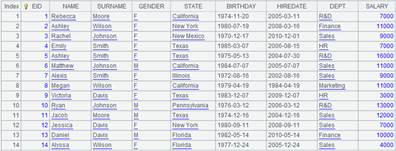
=demo.query("select * from EMPLOYEE") |
|
|
2 |
=A1.(~.array().concat@c()) |
Convert to the sequence of strings.
|
|
3 |
=A2(1).import(;",") |
Select all fields from a specified string in the sequence. Specify comma as the separator, and return a table sequence as the result. |
|
4 |
=demo.query("select EID,NAME,SURNAME from EMPLOYEE") |
|
|
5 |
=A4.export() |
|
|
6 |
=A4.export@t(EID:id,NAME:name,SURNAME:surname;"|") |
|
|
7 |
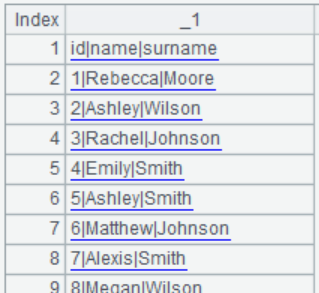
=A5.import() |
No parameters are given. The default separator will be tab, and _1 and _2,… will be used as field names. |
|
8 |
=A6.import@t(id:int,name;"|") |
Select fields id and name, separated by “|” . |
|
9 |
=A6.import@f() |
With @f option, just split the file as a string using the separator.
|
|
10 |
1,2,"3,3",(4,4),[5,5],'6,6' |
|
|
11 |
=A10.import@c() |
With @c option, the default separator is the comma.
|
|
12 |
=A10.import@cp() |
With @p option, parentheses and quotation marks matching will be handled during parsing.
|
|
13 |
=A10.import@cpa() |
With @a option, single quotation marks are treated as quotation marks.
|
|
14 |
=A2(1).import@c() |
With @c option, use comma as the default separator. |
|
15 |
=A5.import@s() |
With @s option, will not split strings and records are imported as a single-field table sequence. |
|
16 |
=A5.import@si() |
A single-field result set will be returned as a sequence. |
|
17 |
"uy'd'uj" |
|
|
18 |
=A17.import() |
|
|
19 |
=A17.import@q() |
With @q option, double quotations will be removed before generating the final table sequence With @q option, first remove quotation marks at both ends of each data item (not handling those within) and then convert data into a table sequence.
|
|
20 |
f1,f2,f3 2,"dd""ff",3 |
|
|
21 |
=A20.import@coq() |
With @o option, two double quotation marks in one string are treated as one.
|
|
22 |
=" abc ".import@k() |
Retain the whitespaces on boths sides. |
|
23 |
=A6.import@te(id:int,name,dept;"|") |
Generate null since dept doesn’t exist in the imported strings. |





When both @d and @n are used:
|
|
A |
|
|
1 |
ID Amount 2 3958 3 4 5824 5 4255 a abc 6 9275 |
|
|
2 |
=A1.import@t() |
Import A1’s string into a table sequence and return result as follows:
|
|
3 |
=A1.import@dt() |
With @d option, delete any rows containing data that does not match the expected types or formats, as well as rows whose column counts do not match the first row. The result is as follows:
|
|
4 |
=A1.import@nt() |
With @n option, @d throws an exception when an error is found. Here’s the error information: Error in cell A4 3: Wrong format row data. |
When @w option is used:
|
|
A |
|
|
1 |
ID Amount 2 3958 3 4 5824 5 4255 a abc 6 9275 |
|
|
2 |
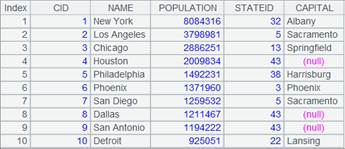
=A1.import@w(;) |
With @w option, import rows as a sequence of sequences:
|
When @1 option is used:
|
|
A |
|
|
1 |
11,22,"3",\ 33,44,55, 66,77,88 |
|
|
2 |
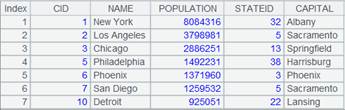
=A1.import@l() |
With @1 option, allow line continuation when a row is ended with the escaping character \:
|
Related function: