index()
Here’s how to use index() functions.
T.index()
Description:
Create an index table for a table sequence.
Syntax:
T.index(n)
Note:
The function creates an index table of length nbase key. The index table will be cleared if n=0, or when the table sequence’s key is reset.
To create an index table, the records’ primary key values need to be unique, otherwise error will be reported. base key
Parameter:
|
T |
A table sequence with a key. |
|
n |
Index length. Use the default index length when the parameter is absent. |
Option:
|
@s |
Create a multilevel tree-structured index and ignore parameter n if the table sequence’s base key is the serial byte key. |
|
@n |
Create an sequence-number-based index for the table sequence, and ignore parameter n when the option works. Directly use record numbers when table sequence T does not have a sequence number key.
The sequence-number-based index is used to achieve foreign key numberization, which refers to the correspondence between foreign key values of the fact table and sequence numbers of the dimension table records. When P.join() and P.switch() work to perform an association operation, the sequence number key can be absent from the join expression. |
|
@m |
Use parallel processing to create the index. |
Return value:
Table sequence
Example:
|
|
A |
|
|
1 |
=demo.query("select EID,NAME,SALARY from EMPLOYEE where EID<4") |
|
|
2 |
=A1.keys(EID) |
Set EID as A1’s key. |
|
3 |
=A1.index(10) |
Create an index table of length 10 for the table sequence. |
|
4 |
=A1.keys(EID,NAME) |
Reset the key for A1’s table sequence and index table is deleted. |
Create a multilevel tree-structured index:
|
|
A |
|
|
1 |
=3.new(k(~:2):id,~*~:num) |
Create a table sequence where id field is serial byte type. |
|
2 |
=A1.keys(id) |
Set id as A1’s key.
|
|
3 |
=A2.index@s() |
As A1’s base key is serial byte type, use @s option to create a multilevel tree-structured index. |
|
4 |
=A2.index(0) |
As parameter is 0, delete the index table. |
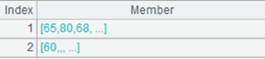
Create an ordinal-number-based index:
|
|
A |
|
|
1 |
=connect("demo").query("SELECT * FROM CITIES") |
Return a table sequence:
|
|
2 |
=connect("demo").query("SELECT * FROM STATECAPITAL") |
Return a table sequence:
|
|
3 |
=A2.index@n() |
Create an ordinal-number index for A2’s table sequence. |
|
4 |
=A1.switch(STATEID,A2) |
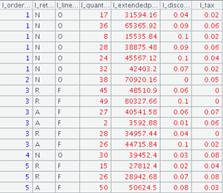
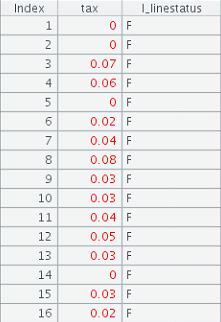
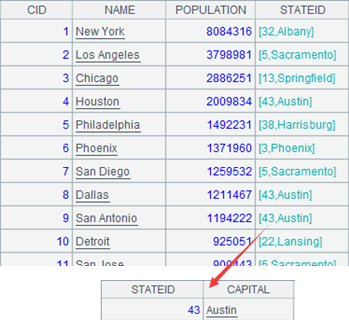
A1’s CITIES table acts as the fact table and A3’s STATECAPITAL as the dimension table; the switch() function performs a table join by converting values of STATEID, the CITIES’s key, to corresponding referencing records in STATECAPITAL. The index table on the foreign key is used during the computation, so the sequence number key is omitted from the expression, which is equivalent to A1.switch(STATEID,A2:#). The statement returns the following result set:
|
Related function:
T.index( n )
Description:
Create an index foran in-memory table.
Syntax:
T.index(n)
Note:
The function creates an index of length n for in-memory table T. Remove the index when parameter n is 0 or the in-memory table reset key.
To create an index table, the in-memory table’s primary key values need to be unique, otherwise error will be reported. base key
Parameter:
|
T |
An in-memory table with unique primary key values. |
|
n |
The length of index. Use the default index length when the parameter is absent. |
Option:
|
@m |
Create the index with parallel processing. |
|
@n |
Ignore parameter n and create a sequence number-based index. Directly use record numbers when in-memory table T does not have a sequence number key. |
|
@s |
Create a multilevel tree-structured index when the in-memory table T’s base key is serial byte type, and ignore parameter n. |
Return value:
In-memory table
Example:
Create index on the in-memory table:
|
|
A |
|
|
1 |
=file("ei.ctx") |
|
|
2 |
=A1.create@y(#EID,NAME,DEPT) |
Create the composite table’s base table and set EID as the key. |
|
3 |
=demo.cursor("select EID,NAME,DEPT from employee") |
|
|
4 |
=A2.append@i(A3) |
Append cursor A3’s data to the composite table. |
|
5 |
=A4.memory() |
Generate an in-memory table from a composite table’s entity. table; the new table inherits the entity table’s key. |
|
6 |
=A5.index(10) |
Create an index of length 10 on the in-memory table. |
|
7 |
=A5.index(0) |
With parameter being 0, the index table is removed. |
Create multilevel tree-structured index on the in-memory table:
|
|
A |
|
|
1 |
=3.new(k(~:2):id,~*~:num) |
Create a table sequence. |
|
2 |
=A1.keys(id) |
Set id as the table sequence’s key. |
|
3 |
=A2.memory() |
Convert the table sequence into an in-memory table, which inherits the former’s key.
|
|
4 |
=A3.index@s() |
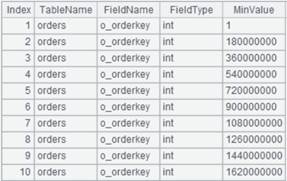
As the in-memory table’s key is serial byte, use @s option to create multilevel tree-structured index for it. |
Create sequence-number-based index for the in-memory table:
|
|
A |
|
|
1 |
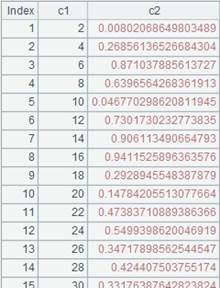
=to(100).new(~*2:c1,rand():c2) |
Create a table sequence.
|
|
2 |
=A1.memory() |
Generate an in-memory table from the table sequence. |
|
3 |
=A2.index@n() |
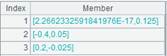
Use @n option to create a sequence number-based index on the in-memory table based on the record numbers as there isn’t a sequence number key in A2’s in-memory tablebase key. |
|
4 |
=A3.find(6) |
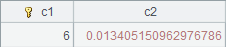
Get the record whose key value is 6 from the in-memory table, which is the one whose sequence number is 6, and return the following result:
|
|
5 |
=A2.keys(c1) |
Reset the in-memory table’s key as c1 field while removing the existing index table. |
|
6 |
=A3.find(6) |
Query the record where the key value is 6 and return the following result:
|
T.index( f:h,w;C,…;F,… )
Description:
Create index file for an entity table.
Syntax:
T.index(f:h,w;C,…;F,…)
Note:
For records of entity table T that meets condition w, use column C,… as the key and create index file object f on it; the index file does not update itself accordingly when the composite table is updated (or reset).
Creating an index file requires the presence of column C,… and index file object f.
Field name of entity table T; the presence of F speeds up the query. When using the index file to retrieve data, get the indexed fields C,… and F field only; retrieve all fields when F is absent.
If parameter h is present and @w option is absent, create a HASH index file whose length his h; create a full-text index file when @w option works; create an ordered index file when both parameter h and @w option are absent. Parameter F should be absent if you need to create a HASH index or full-text index.
When T is an attached table, parameter C cannot be a field inherited from the primary table.
Parameter:
|
T |
An entity table. |
|
f |
Index file object. |
|
w |
Filtering condition; retrieve the whose set if the parameter is absent. |
|
C |
The field for which an index is created. |
|
h |
Hash index length; can be omitted. |
|
F |
Field name in an entity table; can be omitted. |
Option:
|
@2 |
Work when only parameter f is present; used to load the index file to the memory and can increase performance. |
|
@3 |
Work when only parameter f is present; used to load the index file to the memory; help achieve higher performance than @2 but occupy more memory space. |
|
@0 |
Close the index to release resources when only parameter f is present. |
|
@w |
Create a full-text index on column C, which should be a string type single column; Only support like("*X*") style search; X can be a string made up of letters, numbers or common characters, whose length should be greater than 2, or one or more Chinese characters; Case-insensitive when the index string is made up of letters; With this option, parameter h is interpreted as the largest number of records matched with each index string; no such interpretation when h is absent. |
Return value:
Entity table
Example:
Create an ordered index file:
|
|
A |
|
|
1 |
=demo.query("select EID,NAME,BIRTHDAY,DEPT,GENDER,HIREDATE,SALARY from employee ") |
Return a table sequence. |
|
2 |
=file("empi.ctx") |
|
|
3 |
=A2.create@y(#EID,NAME,BIRTHDAY,DEPT,GENDER,HIREDATE,SALARY) |
Create a composite table. |
|
4 |
=A3.append@i(A1) |
Append table sequence A1’s data to the composite table. |
|
5 |
=file("index_dzdpx") |
Create index file object. |
|
6 |
=A3.index(A5,DEPT=="HR";EID;DEPT) |
For data of EID and DEPT fields meeting DEPT=="HR" in composite table A3, create ordered index file index_dzdpx on EID, which is the indexed field. |
|
7 |
=file("index_px") |
Create index file object. |
|
8 |
=A3.index(A7;EID,NAME) |
Create index file index_px for composite table A3 on EID and NAME, which are indexed fields; as parameter F is absent, read all fields of the table. |
|
9 |
=A3.icursor(EID,NAME,DEPT,SALARY;EID<20;A7,A5) |
Query EID, NAME, DEPT and SALARY fields meeting EID<20 in the composite table according to the index file.
|
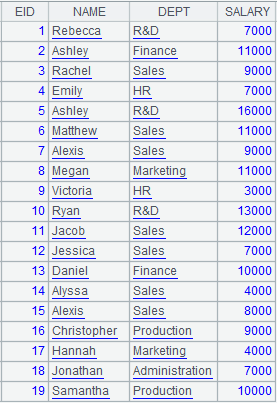
Create a HASH index file:
|
|
A |
|
|
1 |
=file("empi.ctx").open() |
Open the composite table. |
|
2 |
=file("index_hs") |
Create index file object. |
|
3 |
=A1.index(A2:10;DEPT,GENDER) |
Create a HASH index file whose length is 10 for composite table empi.ctx on DEPT and GENDER, which are the indexed fields. |
|
4 |
=A1.icursor(NAME,DEPT,GENDER,SALARY;[["HR","M"]].contain(DEPT,GENDER);A2) |
Use index file index_hs to query data of NAME, DEPT, GENDER and SALARY fields where DEPT is HR and GENDER is M in the composite table and return a cursor, whose content is as follows:
|
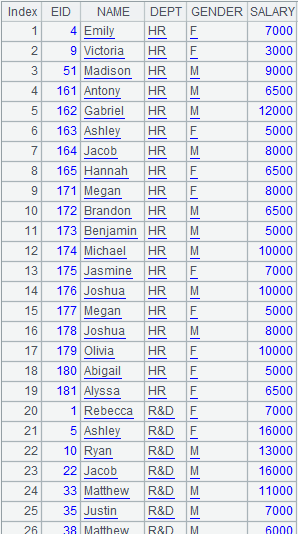
Create a full-text index file:
|
|
A |
|
|
1 |
=file("empi.ctx").open() |
Open the composite table file. |
|
2 |
=file("index_qw") |
Create index file object. |
|
3 |
=A1.index@w(A2;NAME) |
Use @w option to create a full-text index file for composite table empi.ctx on NAME which are the indexed field. |
|
4 |
=A1.icursor(EID,NAME,BIRTHDAY;like(NAME," *ann *");A2) |
Use index file index_qw to query data of EID, NAME and BIRTHDAY fields in the composite table where NAME values contain string “ann” and return result as a cursor, whose content is as follows:
|
|
5 |
=file("index_qw1") |
|
|
6 |
=A1.index@w(A5:5;NAME) |
Use @w to create a full-text index file, whre the index string is case-insensitive; the value of parameter h is 5 means the largest number of records each index string can match. |
|
7 |
=A1.icursor(EID,NAME,BIRTHDAY;like(NAME,"*ANN*");A5) |
Content of the returned cursor is as follows:
|
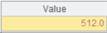

Automatically load the composite table’s index file:
|
|
A |
|
|
1 |
=file("empi.ctx").open() |
Open the composite table file. |
|
2 |
=A1.index@2(file("index_qw")) |
Load the composite table’s index file to the memory. |
|
3 |
=A1.icursor(EID,NAME,BIRTHDAY;like(NAME,"A*");file("index_qw")) |
Use the index file loaded to the memory to query data in the composite table. |
|
4 |
=A1.index@0(file("index_qw")) |
Release the memory resources occupied by the index file. |
|
5 |
>A1.close() |
Close the composite table. |
T.index(I:h,w;C,…)
Description:
Create one or multiple non-primary-key-based indexes for an in-memory table.
Syntax:
T.index(I:h,w;C,…)
Note:
Create index I for records meeting condition w, which can be omitted, based on non-key field(s) C,….
When parameter h is present, create a hash index of length h. When parameter h is 0, automatically compute the hash table length using the default value.
Delete index I when parameter C is absent, and delete all existing indexes when parameter I is absent.
The function creates one or multiple non-primary-key-based indexes for in-memory table T during creating a cursor.
Parameter:
|
T |
An in-memory table. |
|
I |
Index name. |
|
w |
Filtering condition; read the whole set when it is absent. |
|
C |
The field(s) on which index is created. |
|
h |
Index length. |
Return value:
In-memory table
Example:
|
|
A |
|
|
1 |
=demo.cursor("select * from SCORES ") |
|
|
2 |
=file("SCORES_ClassTwo.ctx") |
Create a composite table file. |
|
3 |
=A2.create@y(#CLASS,#STUDENTID,SUBJECT,SCORE) |
Create the composite table’s base table, where CLASS,#STUDENTID is the composite table’s key. |
|
4 |
=A3.append@i(A1) |
Append data of A1’s cursor to the base table. |
|
5 |
=A4.memory() |
Generate an in-memory table. |
|
6 |
=A5.index(index1:10,CLASS =="Class one";SCORE) |
Create a non-primary-key-based index named index1 for A5’s in-memory table. |
|
7 |
=A5.icursor(;;index1) |
Query in-memory table data according to the table’s index name, and return result as a cursor. |