import()
Here’s how to use import() functions.
S.import()
Description:
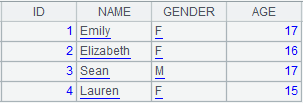
Retrieve contents from strings as records and return them as a table sequence.
Syntax:
S.import(Fi:type;fmt,…;s)
Note:
The function retrieves specified or all fields from string S and returns them as a table sequence.
Parameter:
|
S |
A string. Format: separate the records by line break, and the fields by user-defined separator; the default separator is tab. |
|
Fi |
Fields to be retrieved; by default, all fields will be retrieved. |
|
type |
Field types include bool, int, long, float, decimal, number, string, date, time and datetime; data type of the first row will be used by default; it is a serial byte key. when the value is an integer; only 16 bytes are allowed in a serial byte value. |
|
fmt |
Date\time format. |
|
s |
User-defined separator; the default is tab. |
Option:
|
@t |
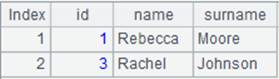
Take the first row in f as the field name. If not using this option, then use _1, and _2,… as the field name. |
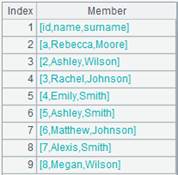
|
@c |
Use comma as the separator when parameter s is absent. |
|
@s |
Will not split strings and data will be imported as a table sequence consisting of strings of single field values; and ignore parameters. |
|
@i |
Return the result set as a sequence if it only contains one field. |
|
@q |
Remove the quotation marks, if any, from both ends of data items, including the field names, and handle escape sequences; but will keep quotation marks within the data item. |
|
@a |
Treat single quotes as what they are; left not handled by default, and can work with @q@p. |
|
@o |
Perform escaping according to the Excel rule, which identifies two double quotation marks as one and does not escape the other characters. |
|
@p |
Enable handling the matching of parentheses (not including the separators within the parentheses) and quotes, as well as the escape sequences outside of the quotes. |
|
@f |
Split the file content into a string by the separator without parsing. |
|
@l |
Allow line continuation and put an escape character \ at the end the line. |
|
@k |
Retain white spaces on both sides of the data item; without it, white spaces on both ends will be automatically deleted. |
|
@e |
Generate null if parameter Fi isn’t included in the imported strings; by default, there will be an error report. |
|
@d |
Delete a record if it contains unmatching data types or data formats and start examining data by type, or if the parentheses and the quotation marks in it do not match when @p option and @q option respectively are present. |
|
@n |
Ignore a row whose number of columns don’t match the first row. |
|
@v
|
In corporation with @d or @n, if a mismatch appears, throw an exception, terminate the execution and output the content of the problem record. |
|
@w |
Read each row, including the column headers row, as a sequence and return a sequence of sequences. |
|
@r |
Read contents as a string before parsing so that errors about some character sets can be avoided; the option slows the computation. |
Return value:
Table sequence
Example:
|
|
A |
|
|
1 |
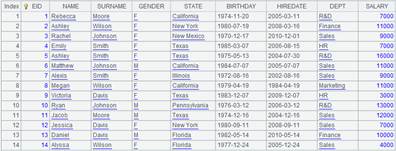
=demo.query("select * from EMPLOYEE") |
|
|
2 |
=A1.(~.array().concat@c()) |
Convert to the sequence of strings.
|
|
3 |
=A2(1).import(;",") |
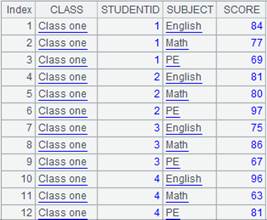
Select all fields from a specified string in the sequence. Specify comma as the separator, and return a table sequence as the result. |
|
4 |
=demo.query("select EID,NAME,SURNAME from EMPLOYEE") |
|
|
5 |
=A4.export() |
|
|
6 |
=A4.export@t(EID:id,NAME:name,SURNAME:surname;"|") |
|
|
7 |
=A5.import() |
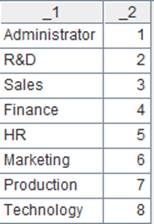
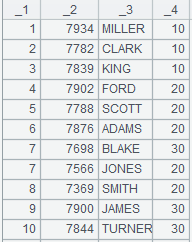
No parameters are given. The default separator will be tab, and _1 and _2,… will be used as field names. |
|
8 |
=A6.import@t(id:int,name;"|") |
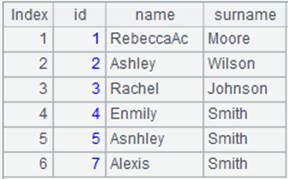
Select fields id and name, separated by “|” . |
|
9 |
=A6.import@f() |
With @f option, just split the file as a string using the separator.
|
|
10 |
1,2,"3,3",(4,4),[5,5],'6,6' |
|
|
11 |
=A10.import@c() |
With @c option, the default separator is the comma.
|
|
12 |
=A10.import@cp() |
With @p option, parentheses and quotation marks matching will be handled during parsing.
|
|
13 |
=A10.import@cpa() |
With @a option, single quotation marks are treated as quotation marks.
|
|
14 |
=A2(1).import@c() |
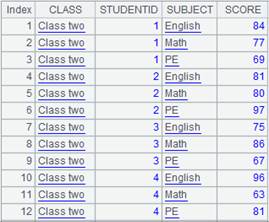
With @c option, use comma as the default separator. |
|
15 |
=A5.import@s() |
With @s option, will not split strings and records are imported as a single-field table sequence. |
|
16 |
=A5.import@si() |
A single-field result set will be returned as a sequence. |
|
17 |
"uy'd'uj" |
|
|
18 |
=A17.import() |
|
|
19 |
=A17.import@q() |
With @q option, double quotations will be removed before generating the final table sequence With @q option, first remove quotation marks at both ends of each data item (not handling those within) and then convert data into a table sequence.
|
|
20 |
f1,f2,f3 2,"dd""ff",3 |
|
|
21 |
=A20.import@coq() |
With @o option, two double quotation marks in one string are treated as one.
|
|
22 |
=" abc ".import@k() |
Retain the whitespaces on boths sides. |
|
23 |
=A6.import@te(id:int,name,dept;"|") |
Generate null since dept doesn’t exist in the imported strings. |
|
24 |
id|name|surname a|Rebecca|Moore 2|Ashley|Wilson 3|Rachel|Johnson 4|Emily|Smith 5|Ashley|Smith 6|Matthew|Johnson 7|Alexis|Smith 8|Megan|Wilson |
|
|
25 |
=A24.import@td(id:int,name;"|") |
Delete the record as it contains unmatching data types. |
|
26 |
=A24.import@tvd(id:int,name;"|") |
Check data type matching, and, if error reports, throw an exception, terminate the execution and output the content of the problem record; the error message is: Error in cell A26.
|
|
27 |
id|name|surname 1|Rebecca|Moore 2|Ashley 3|Rachel|Johnson 4|Emily |
|
|
28 |
=A27.import@tdn(id:int,name,surname;"|") |
Ignore row 2 and row 3 because the number of columns don’t match that of the table sequence.
|
|
29 |
=A24.import@w(;"|") |
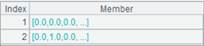
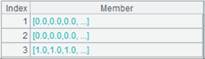
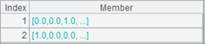
Use @w option to read each row as sequecne of sequences.
|
|
30 |
11,22,"3",\ 33,44,55, 66,77,88 |
|
|
31 |
=A30.import@l() |
With @1 option, allow line continuation when there is an escape character at the end of the line.
|




Related function:
f. import()
Description:
Read contents from a file and return them as a table sequence.
Syntax:
|
f.import() |
|
|
f.import(Fi:type:fmt,…;k:n,s) |
Retrieve the kth segment of the n segments from the text file. Fi represents the retrieved field; all fields will be retrieved by default. s is the user-defined separator; the default is tab. When retrieving a file segment by segment, it intelligently identifies the ending points to ensure the retrieved records in each segment are complete and all retrieved records are continuous and unique. |
Note:
The function retrieves file f and returns a table sequence where each record consists of a line of f.
Parameter:
|
f |
A file object, which can be a data file of txt, csv and btx format. Use f.xlsexport() to write data of an Excel file. |
|
Fi |
Fields to be retrieved. All fields will be retrieved by default. The sign # is used to represent a field with a sequence number. |
|
type |
Field types include bool, int, long, float, decimal, string, date, time and datetime. Data type of the first row will be used by default; when the parameter value is an integer, it represents serial byte key, which allows 16 bytes only. |
|
fmt |
Date\time format. |
|
s |
User-defined separator; the default separator is tab. When the parameter is omitted, the comma preceding it can be omitted, too. |
|
k |
The segment number. |
|
n |
The number of segments. Retrieve the whole file when both k and n are omitted. |
Option:
|
@t |
Use the first row of f as the field name. If this option is not used, _1, _2,… will be used as field names; keep the original field names if Fi is #i. |
|
@b |
Retrieve data from a binary file exported in the export method, with support for parameter Fi, k and n and without support for parameters type and s. Options @t, @s, @i, @q, @a, @n, @k, @p, @f, @l, @m, @c, @o, @d, @v and @r will be ignored; do not work with @k option and @n option. The segmental retrieval could result in empty segment in cases when a file has only a very small number of records or it is unable to be segmented. |
|
@e |
Make the function return null when Fi doesn’t exist in the file; raise an error when the option is absent. |
|
@s |
Do not split the to-be-retrieved field when it is imported as a cursor whose content is a table sequence consisting of strings of a single field; in this case the parameters will be ignored. |
|
@i |
If the result set has only one column, return it as a sequence. |
|
@q |
Remove the quotation marks, if any, from both ends of data items, including the field names, and handle escape sequences; but will keep quotation marks within the data item. |
|
@a |
Treat single quotes as what they are; left not handled by default, and can work with @q@p. |
|
@p |
Enable handling the matching of parentheses (not including the separators within the parentheses) and quotes, as well as the escape sequences outside of the quotes. |
|
@f |
Split the file content into a string by the separator without parsing. |
|
@l |
Allow line continuation where there is an escape character \ at the end of the line. |
|
@m |
Use multithreads to increase data retrieval speed, but this will leave an indefinite order for members of the result set. This option will be ignored when parameters k and n exist and it is often used to retrieve data from big files. More than one parallel thread should be specified in configuration information. errors may appear when @o option or parameters k:n are present. |
|
@c |
Use comma as the separator when the parameter s is absent. |
|
@o |
Perform escaping according to the Excel rule, which identifies two double quotation marks as one and does not escape the other characters. |
|
@k |
Retain white spaces on both sides of the data item; without it, white spaces on both ends will be automatically deleted. |
|
@d |
Delete a record if it contains unmatching data types or data formats and start examining data by type, or if the parentheses and the quotation marks in it do not match when @p option and @q option respectively are present. |
|
@n |
Ignore and discard rows whose number of columns don’t match the first row. |
|
@v
|
Verify data type matching when @d option and @n option are present, and, if error reports, throw an exception, terminate the execution and output the content of the problem record. |
|
@w |
Read each row, including the column headers row, as a sequence and return a sequence of sequences. |
|
@r |
Read contents as a string before parsing so that errors about some character sets can be avoided; the option slows the computation. |
|
@y |
Parse the file data as a table sequence with fixed-length fields. In this case, parameter fmt is regarded as the field’s length. When parameter type is datetime, compute field’s length using fmt. This option does not work with @t option. With this option, parameter Fi is interpreted as a result field name; when this parameter is absent, just skip this field during parsing. Do not change the order of fields in the original file. When @e option is present, fields for which fmt isn’t specified are regarded as the newly-added empty ones; the normal parsing will trigger an error report. |
Return value:
Table sequence
Example:
|
|
A |
|
|
1 |
=file("D:\\score.txt").import() |
|
|
2 |
=file("D:\\score.txt").import@t() |
|
|
3 |
=file("D:\\score.txt").import(;1:2) |
With Fi and s omitted, get the data of the first of the multiple segments. |
|
4 |
=file("D:\\Department2.txt").import(;"|") |
With Fi, k and n omitted, the whole file is imported. |
|
5 |
=file("D:\\Department2.txt").import(;1:3,"|") |
Omit the fields to be imported. |
|
6 |
=file("D:\\ EMPLOYEE.txt").import@c(GENDER;1:2) |
Retrieve the first segment of GENDER field of comma-seperated EMPLOYEE1.txt. |
|
7 |
=file("D:\\Department5.txt").import@t(DEPT, MANAGER:int; 1:3,"/") |
The contents
of Department5.txt are separated
with slash and retrieved by the specified fields DEPT and MANAGER. |
|
8 |
=file("D:\\ score.txt").import@e(EID;1:3) |
Return null because there’s no EID field in score.txt. |
|
9 |
=file("D:\\Department.txt").import@ts() |
|
|
10 |
=file("D:\\EMPLOYEE.btx").import@b(;1:2) |
Retrieve the first segment of bin file EMPLOYEE.btx. |
|
11 |
=file("D:\\orders.txt").import@mt(;",") |
Increase the speed of retrieving data from the big file. The record order in the result is not the same as that in the file. |
|
12 |
=file("D:\\StuName.txt").import@i() |
StuName.txt has only one column, so return it as a sequence. |
|
13 |
=file("D:\\test.txt").import@t() |
Certain field names and field values are quoted.
|
|
14 |
=file("D:\\test.txt").import@tq() |
With @q option, quotation marks at both ends of each data item (including each field name) are removed without handling those within.
|
|
15 |
=file("D:\\Sale1.txt").import() |
Get all records from Sale1.txt. |
|
16 |
=file("D:\\ Sale1.txt").import(#1,#3) |
Get the first column and the third column from Sale1.txt. |
|
17 |
=file("D:/Dep3.txt").import@cqo() |
Here is the Dep3.txt file:
With @o option, two double quotation marks are treated as one and return the result as follows:
|
|
18 |
=file("D:/Dep1.txt").import@k() |
Retain the whitespaces on both sides of the data item. |
|
19 |
=file("D:/Department1.txt").import@t(id:int,name;,"|") |
|
|
20 |
=file("D:/Department1.txt").import@td(id:int,name;,"|") |
Delete the record as it contains unmatching data types. |
|
21 |
=file("D:/Department1.txt").import@tdv(id:int,name;,"|") |
Check data type matching, and, if error reports, throw an exception, terminate the execution and output the content of the problem record. |
|
22 |
=file("Dep2.txt").import@tdn(id:int,name,surname;,"|") |
Here’s the file Dep2.txt:
Ignore and discard row 6 and row 8 because the number of columns don’t match that of the first row.
|
|
23 |
=file("D://EMP1.txt").import@s(;1:2) |
Don’t split field values to import as a single-field table; ignore the parameters. |
|
24 |
=file("D://EMP2.txt").import(#2:date:"yyyy/MM/dd") |
EMP2txt:
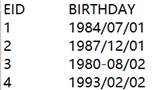
Parse data in yyyy/MM/dd format as a date type field.
|
|
25 |
=file("City.txt").import@w() |
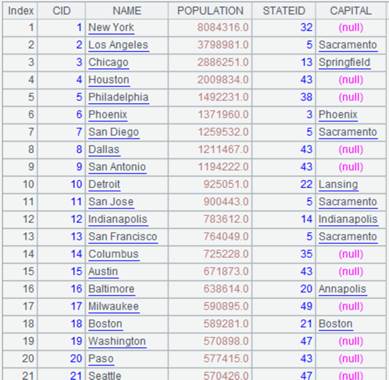
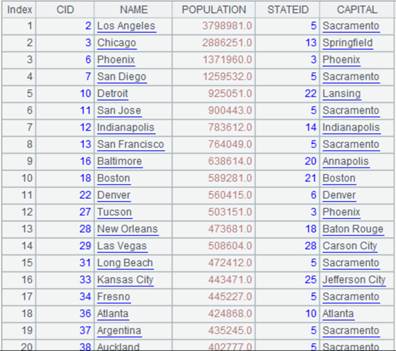
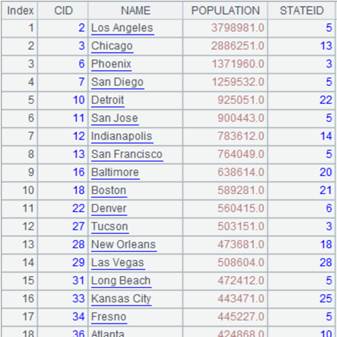
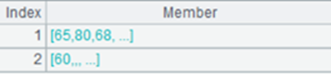
Use @w option to return a sequence of sequences.
|
|
26 |
=file("D://t1.txt").import@c() |
Below is file t1.txt:
With @c option, use the comma as the separator by default and return result as follows:
|
|
27 |
=file("D://t1.txt").import@cp() |
With @p option, parentheses and quotation marks matching will be handled during parsing.
|
|
28 |
=file("D://t1.txt").import@cpa() |
With @a option, single quotation marks are identified as quotation marks.
|
|
29 |
=file("D://t2.txt").import@l() |
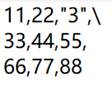
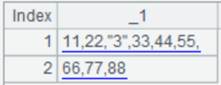
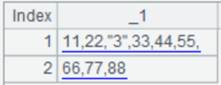
Below is file t2.txt:
With @1 option, allow line continuation when there is an escape character at the end of the line.
|
|
30 |
=file("D://t3.txt").import@f() |
With @f option, just split the file as a string using the separator.
|





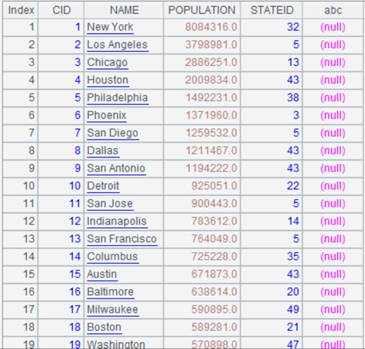


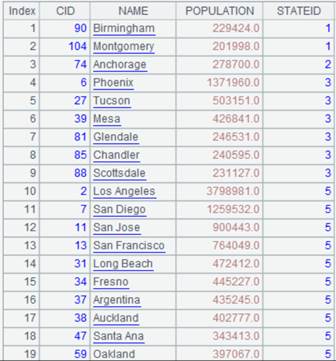
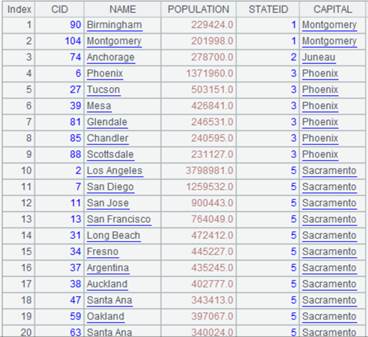
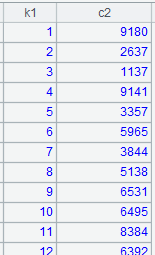
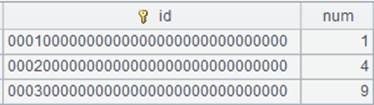
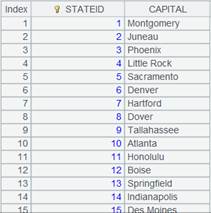

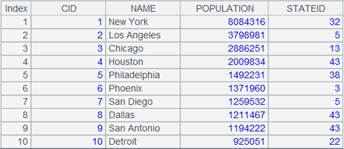

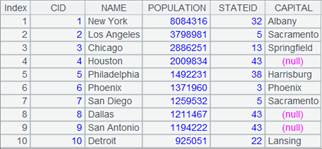
Parse the file as a table sequence with fixed-length fields:
|
|
A |
|
|
1 |
=file("um.txt") |
|
|
2 |
=A1.import() |
Read data from um.txt and return the following content:
|
|
3 |
=A1.import@y(UID:int:1,Amount:int:5,Udate:string:18) |
@y option enables a fixed-length parsing. The 1st column is named UID, its length is 1 and its type is int; the 2nd column is named Amount, its length is 18 and its type is string. The result is as follows:
|
|
4 |
=A1.import@y(UID:int:1,Amount:int:5,Udate:datetime:"yyyy-MM-ddHH:mm:ss") |
The 3rd column is datetime type, according to which its length is computed. The result is as follows:
|
|
5 |
=A1.import@ye(UID:int:1,UName::,Amount:int:5,Udate:string:18) |
With @e option, in the 2nd column is regarded as a newly-added empty one as its parameter fmt is absent. The result is as follows:
|

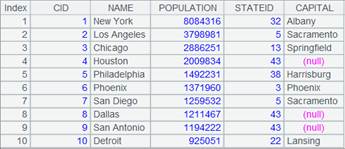

Note:
Text file format: Separate records by carriage return, and fields by the user-defined separator. The default separator is the tab.
Related function:
Description:
Read in records from an entity table and return them as a table sequence.
Syntax:
T.import(x:C,…;wi,...)
Note:
The function, which is equivalent to T.cursor(...).fetch(), retrieves records from entity table T and returns them as a table sequence.
Parameter:
|
T |
An entity table. |
|
x |
An expression. |
|
C |
A column name. |
|
wi |
Filtering condition; retrieve the whole set when this parameter is absent; separate multiple conditions by comma(s) and their relationships are AND. Besides regular filtering expressions, you can also use the following five types of syntax in a filtering condition, where K is a field in the entity table: 1.K=w w usually uses expression Ti.find(K) or Ti.pfind(K), where Ti is a table sequence. When value of w is null or false, the corresponding record in the entity table will be filtered away; when w is expression Ti.find(K) and the to-be-selected fields C,... contain K, Ti’s referencing field will be assigned to K; when w is expression Ti.pfind(K) and the to-be-selected fields C,... contain K, sequence numbers of K values in Ti will be assigned to K. 2.(K1=w1,…Ki=wi,w) Ki=wi is an assignment expression. Generally, parameter wi can use expression Ti.find(Ki) or Ti.pfind(K), where Ti is a table sequence; when wi is expression Ti.find(Ki) and the to-be-selected fields C,... contain Ki, Ti’s referencing field will be assigned to Ki correspondingly; when wi is expression Ti.pfind(Ki) and the to-be-selected fields C,... contain Ki, sequence numbers of Ki values in Ti will be assigned to Ki. w is filter expression; you can reference Ki in w. 3.K:Ti Ti is a table sequence. Compare Ki value in the entity table with key values of Ti and discard records whose Ki value does not match; when the to-be-selected fields C,... contain K, Ti’s referencing field will be assigned to K. 4.K:Ti:null Filter away all records that satisfy K:Ti. 5.K:Ti:# Locate records according to sequence numbers, compare sequence numbers of records in table sequence Ti according to the entity table’s K values, and discard non-matching records; when the to-be-selected fields C,... contain K, Ti’s referencing field will be assigned to K. |
Option:
|
@v |
Enable generating a pure table sequence; only supported by esProc Enterprise Edition. |
|
@x |
Automatically close the entity table after data is fetched from the cursor. |
Return value:
Table sequence
Example:
|
|
A |
|
|
1 |
for 100 |
|
|
2 |
=to(10000).new(#:k1,rand():c1).sort@o(k1) |
Generate a set of random data. |
|
3 |
=to(10000).new(#:k1,rand(10000):c2,rand()*1000:c3).sort@o(k1) |
|
|
4 |
=A2.cursor() |
|
|
5 |
=A3.cursor() |
|
|
6 |
=file("D:\\tb1.ctx") |
Create composite table’s base table. |
|
7 |
=A6.create(#k1,c1) |
|
|
8 |
=A7.append(A4) |
|
|
9 |
=A7.attach(table4,c2,c3) |
|
|
10 |
=A9.append(A5) |
|
|
11 |
=A9.cursor(;c2<1000;2:3) |
Divide records in A9’s attached table where c2 is less than 1000 into 3 segments and return columns in the 2nd segment as a cursor. |
|
12 |
=A11.fetch() |
Fetch data from A11’s cursor. |
|
13 |
=A9.import@x(;c2<1000;2:3) |
Same result as A12; automatically close A9’s entity table after records are retrieved. |
Use special types of filtering conditions:
|
|
A |
|
|
1 |
=file("emp.ctx") |
|
|
2 |
=A1.open() |
Open the composite table file. |
|
3 |
=A2.import() |
As no parameters are present, return all data in the entity table.
|
|
4 |
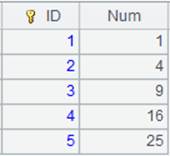
=5.new(~:ID,~*~:Num).keys(ID) |
Generate a table sequence using ID as the key:
|
|
5 |
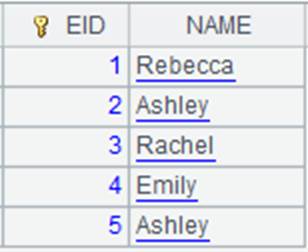
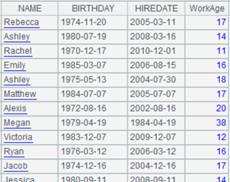
=A2.import(EID,NAME;EID=A4.find(EID)) |
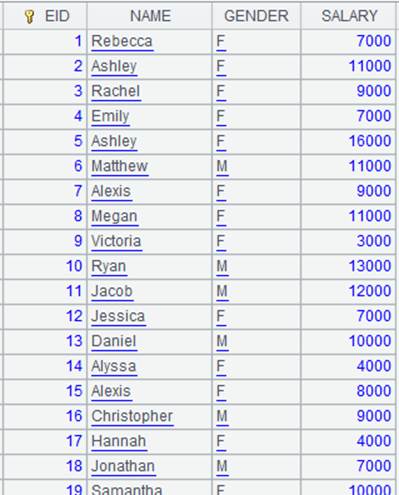
Use filter mode K=w; in this case w is Ti.find(K) and entity table records making EID=A4.find(EID) get null or false are discarded; EID is the selected field, to which table sequence A4’s referencing field is assigned.
|
|
6 |
=A2.import(EID,NAME;EID=A4.pfind(EID)) |
Use filter mode K=w; in this case w is Ti.pfind(K) and entity table records making EID=A4.pfind(EID) get null or false are discarded; EID is the selected field, to which its sequence numbers in table sequence A4 are assigned.
|
|
7 |
=A2.import(EID,NAME;EID:A4) |
Use filter mode K:Ti; compare the entity table’s EID values with the table sequence’s key values and discard entity table records that cannot match.
|
|
8 |
=A2.import(NAME,SALARY;EID:A4) |
This is a case where K isn’t selected; EID isn’t the selected field, so only filtering is performed.
|
|
9 |
=A2.import(EID,NAME;EID:A4:null) |
Use filter mode K:Ti:null; compare the entity table’s EID values with the table sequence’s key values and discard entity table records that can match.
|
|
10 |
=A2.import(EID,NAME;EID:A4:#) |
Use filter mode K:Ti:#; compare with sequence numbers of table sequence’s records according to the entity table’s EID values, and discard records that cannot match.
|
|
11 |
=connect("demo").query("select top 2 NAME,GENDER from employee").keys(NAME) |
Return a table sequence using NAME as the key:
|
|
12 |
=A2.import(EID,NAME;(EID=A4.find(EID),NAME=A11.find(NAME),EID!=null&&NAME!=null)) |
Use filter mode (K1=w1,…Ki=wi,w); return records that meet all conditions.
|




T.import()
Description:
Get a table sequence based on a pseudo table.
Syntax:
T.import(xi:Ci,…)
Note:
The function gets a table sequence based on pseudo table T by specifying field expressions xi and field names Ci, which, by default, field names in the pseudo table. It gets a table sequence using all fields of the pseudo table when parameters xi:Ci are absent.
Only supported by esProc Enterprise Edition.
Parameter:
|
T |
A pseudo table. |
|
xi |
A field expression. |
|
Ci |
Field name in the result table sequence. |
Return value:
Table sequence
Example:
|
|
A |
|
|
1 |
=create(file).record(["D:/file/pseudo/empT.ctx"]) |
|
|
2 |
=pseudo(A1) |
Generate a pseudo table object. |
|
3 |
=A2.import() |
Get a table sequence from A2’s pseudo table using all its fields since no parameters are present.
|
|
4 |
=A2.import(EID:eid,NAME,SALARY:salary) |
Retrieve fields EID, NAME and SALARY from the pseudo table to form a table sequence, and rename fields eid, NAME and salary respectively.
|