switch()
Here’s how to use switch() function.
P.switch(F i ,A i :x;… )
Description:
Replace values of the sequence number key field with the corresponding referenced records, or, sometimes vice versa.
Syntax:
P.switch(Fi, Ai:x;…)
Note:
The function replaces values of foreign key field Fi in table sequence/record sequence P with the corresponding records in table sequence/record sequence Ai according to the matching condition that Fi value is equal to Ai’s x field value (Fi value becomes null if it does not have a matching record), , and returns a table sequence with switched Fi values.
Take the Attendance table as an example. The employeeID field may store either the corresponding primary key values of employeeID or the referenced records in Employee table. So, the switch() function can be used to switch between the two objects.
Use the index table of the foreign key if any and create one if unavailable.
Parameter:
|
P |
A table sequence/record sequence. |
|
Fi |
The foreign key of P. |
|
Ai |
A table sequence/record sequence Fi is. |
|
x |
An Ai table field referenced by Fi field. It is by default Ai’s primary key. When this parameter is #, directly use the sequence number to locate the corresponding record. If Ai has a sequence-number-based index, symbol # can be omitted. |
Option:
|
@i |
Delete Ai records that do not have a matching Fi field value. |
|
@d |
Perform the inverse operation of @i, which obtains records that have no value corresponding to Fi; with the option do not populate F with nulls. |
|
@1 |
If the Fi field value of a specified P record doesn’t exist in Ai, generate a record of the same structure as Ai in Fi while setting Fi as the primary key. |
Return value:
Table sequence
Example:
|
|
A |
|
|
1 |
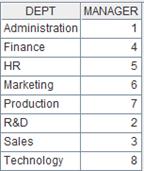
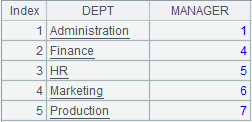
=demo.query("select top 5 * from DEPARTMENT") |
Return a table sequence:
|
|
2 |
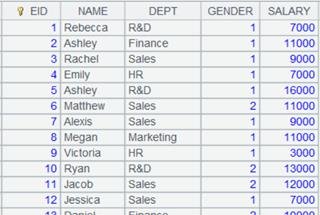
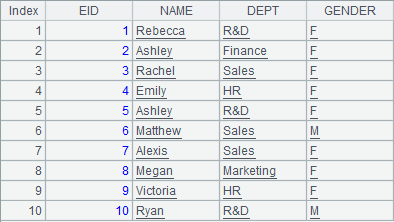
=demo.query("select top 10 EID,NAME,DEPT,GENDER from EMPLOYEE") |
Return a table sequence:
|
|
3 |
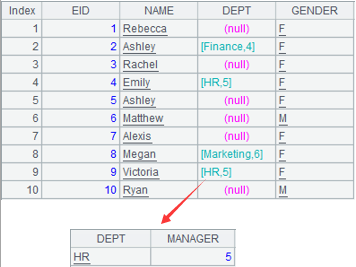
=A2.switch(DEPT,A1:DEPT) |
Table sequence A2’s foreign key DEPT has a correspondence relationship with table sequence A1’s DEPT field. Replace the foreign key value with the referenced records in A1, and enter null if no matching A1 record can be found.
|
When parameter x is absent:
|
|
A |
|
|
1 |
=demo.query("select * from DEPARTMENT").keys(DEPT) |
Return a table sequence that use DEPT as the primary key. |
|
2 |
=demo.query("select top 10 EID,NAME,DEPT,GENDER from EMPLOYEE") |
Return a table sequence: |
|
3 |
=A2.switch(DEPT,A1) |
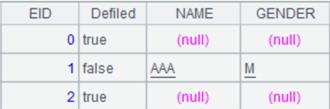
As parameter x is absent, match table A2’s foreign key DEPT with table A1’s primary key and replace the foreign key values with their referenced records in A1:
|
Use the sequence number represented by parameter x to locate corresponding record when table Ai has a sequence number-based index:
|
|
A |
|
|
1 |
=connect("demo").query("SELECT * FROM CITIES") |
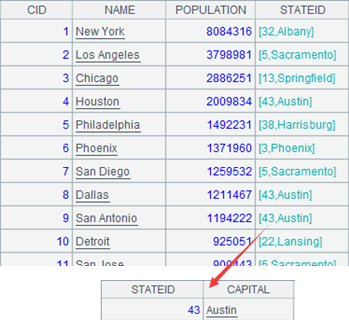
Return a table sequence:
|
|
2 |
=connect("demo").query("SELECT * FROM STATECAPITAL") |
Return a table sequence: |
|
3 |
=A2.index@n() |
Create a sequence number-based index for table A2. |
|
4 |
=A1.switch(STATEID,A2) |
A1’s CITIES table is the fact table, A3’s STATECAPITAL is the dimension table; The switch() function performs table association by replacing values of foreign key field STATEID in CITIES table with the referenced records in STATECAPITAL table. The computation uses the index table created on the foreign key, and by doing so, the sequence number key can be omitted from expression x. Here the statement is equivalent to A1.switch(STATEID,A2:#). The statement returns the following result set:
|
When @i option works:
|
|
A |
|
|
1 |
=demo.query("select * from DEPARTMENT").keys(DEPT) |
Return a table sequence that uses DEPT as the primary key.
|
|
2 |
=demo.query("select top 10 EID,NAME,DEPT,GENDER from EMPLOYEE") |
Return a table sequence. |
|
3 |
=A2.switch@i(DEPT,A1) |
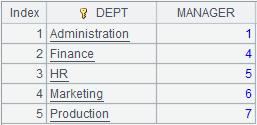
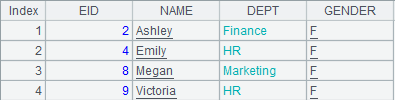
With @i option, delete the whole A2 record when it does not have a matching key value in A1:
|
When @d option works:
|
|
A |
|
|
1 |
=demo.query("select * from DEPARTMENT").keys(DEPT) |
Return a table sequence that uses DEPT as the primary key.
|
|
2 |
=demo.query("select top 10 EID,NAME,DEPT,GENDER from EMPLOYEE") |
Return a table sequence. |
|
3 |
=A2.switch@d(DEPT,A1) |
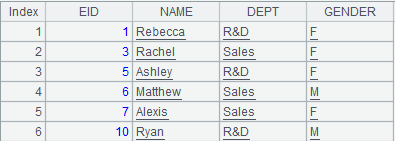
With @d option, only return A2 records where DEPT field does not have a matching value in A1’s foreign key field:
|
When @1 option works:
|
|
A |
|
|
1 |
=demo.query("select * from DEPARTMENT").keys(DEPT) |
Return a table sequence that uses DEPT as the primary key.
|
|
2 |
=demo.query("select top 10 EID,NAME,DEPT,GENDER from EMPLOYEE") |
Return a table sequence. |
|
3 |
=A2.switch(DEPT,A1) |
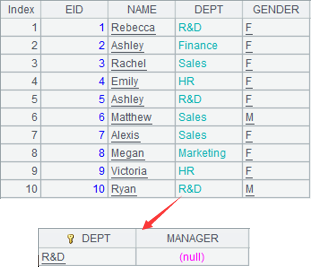
With @1 option, generate a record of same structure as table A1 in DEPT field; the record’s primary key value is DEPT:
|
Related function:
ch.switch(Fi,Ai:x;… )
Description:
Attach a referencing field-based switch operation to a channel and return the original channel.
Syntax:
ch.switch(Fi,Ai:x;…)
Note:
The function attaches a computation to channel ch, which will switch values of field Fi to the referenced records of Ai, and return the original channel ch.
x is Ai’s primary key or logical primary key. The matching condition for the switch is Fi=x. By default, display Fi value as null when no match can be found in Ai for Fi.
This is an attached computation.
Parameter:
|
ch |
A channel. |
|
Fi |
A field in channel ch. |
|
Ai |
A table sequence/record sequence. |
|
x |
Ai’s primary key or logical primary key; if x is already set as the primary key of Ai, parameter x can be omitted. |
Option:
|
@i |
I Delete Ai records that do not have a matching Fi field value. |
|
@d |
Perform the inverse operation of @i, which obtains the records that have no value corresponding to F. |
|
@1 |
If the Fi field value of a record in channel ch doesn’t exist in Ai, then generate a record of the same structure as Ai with expression Fi being the primary key; note that the option uses number 1. |
Return value:
Channel
Example:
x is Ai’s primary key:
|
|
A |
|
|
1 |
=demo.cursor("SELECT top 10 EID,DEPT,NAME FROM EMPLOYEE") |
Return a cursor, whose data is as follows:
|
|
2 |
=demo.query("SELECT DEPT,MANAGER FROM DEPARTMENT").keys(DEPT) |
Return a table sequence using DEPT as the key:
|
|
3 |
=channel() |
Create a channel. |
|
4 |
=A3.switch(DEPT,A2) |
Attach a computation to channel A3, which will switch DEPT field values to A2’s records pointed by the referencing field, and return result to channel A3; as A2’s key is DEPT, parameter x can be omitted. |
|
5 |
=A4.fetch() |
Execute the result fetching function in channel A2 and keep the current data in channel. |
|
6 |
=A1.push(A3) |
Be ready to push cursor A1’s data to channel A3, but the action needs to wait. |
|
7 |
=A1.skip() |
Fetch data from cursor A1 while pushing data to channel to execute the attached computation and keep the result. |
|
8 |
=A3.result() |
Get channel A3’s result:
|

x is Ai’s primary key or logical primary key:
|
|
A |
|
|
1 |
=demo.cursor("SELECT top 10 EID,DEPT,NAME FROM EMPLOYEE") |
Return a cursor, whose data is as follows:
|
|
2 |
=demo.query("SELECT top 6 DEPT,MANAGER FROM DEPARTMENT") |
Return a table sequence:
|
|
3 |
=channel(A1) |
Be ready to push cursor A1’s data to channel A3, but the action needs to wait. |
|
4 |
=A3.switch(DEPT,A2:DEPT) |
Attach a computation to channel A3, which will match its DEPT field with the corresponding DEPT field value in A2 – display a result record as null if no match can be found, and return the result to channel A3. |
|
5 |
=A4.fetch() |
Execute the result fetching function in channel A2 and keep the current data in channel. |
|
6 |
=A1.skip() |
Fetch data from cursor A1 while pushing data to channel to execute the attached computation and keep the result. |
|
7 |
=A3.result() |
Get channel A3’s result:
|
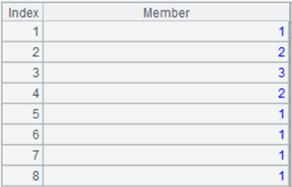
Use @i option to directly delete records in the channel that do not have matches:
|
|
A |
|
|
1 |
=demo.cursor("SELECT top 10 EID,DEPT,NAME FROM EMPLOYEE") |
Return a cursor whose data is as follows:
|
|
2 |
=demo.query("SELECT top 6 DEPT,MANAGER FROM DEPARTMENT") |
Return a table sequence:
|
|
3 |
=channel(A1) |
Be ready to push cursor A1’s data to channel A3, but the action needs to wait. |
|
4 |
=A3.switch@i(DEPT,A2:DEPT) |
Attach a computation to channel A3, which will match its DEPT field with the corresponding DEPT field value in A2 – use @i option to delete records that cannot find matches, and return the result to channel A3. |
|
5 |
=A4.fetch() |
Execute the result fetching function in channel A2 and keep the current data in channel. |
|
6 |
=A1.skip() |
Fetch data from cursor A1 while pushing data to channel to execute the attached computation and keep the result. |
|
7 |
=A3.result() |
Get channel A3’s result:
|

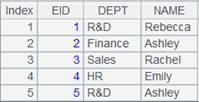
Use @d option to retain the non-matching records only:
|
|
A |
|
|
1 |
=demo.cursor("SELECT top 10 EID,DEPT,NAME FROM EMPLOYEE") |
Return a cursor whose data is as follows:
|
|
2 |
=demo.query("SELECT top 6 DEPT,MANAGER FROM DEPARTMENT") |
Return a table sequence;
|
|
3 |
=channel(A1) |
Be ready to push cursor A1’s data to channel A3, but the action needs to wait. |
|
4 |
=A3.switch@i(DEPT,A2:DEPT) |
Attach a computation to channel A3, which will match its DEPT field with the corresponding DEPT field value in A2 – use @d option to retain only the non-matching records, and return the result to channel A3. |
|
5 |
=A4.fetch() |
Execute the result fetching function in channel A2 and keep the current data in channel. |
|
6 |
=A1.skip() |
Fetch data from cursor A1 while pushing data to channel to execute the attached computation and keep the result. |
|
7 |
=A3.result() |
Get channel A3’s result:
|
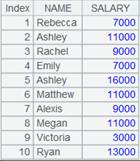
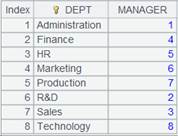
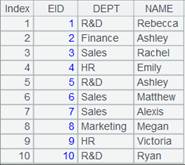
Use @1 option;
|
|
A |
|
|
1 |
=demo.cursor("SELECT top 10 EID,DEPT,NAME FROM EMPLOYEE") |
Return a cursor whose data is as follows:
|
|
2 |
=demo.query("SELECT top 6 DEPT,MANAGER FROM DEPARTMENT") |
Return a table sequence:
|
|
3 |
=channel(A1) |
Be ready to push cursor A1’s data to channel A3, but the action needs to wait. |
|
4 |
=A3.switch@i(DEPT,A2:DEPT) |
Attach a computation to channel A3, which will match its DEPT field with the corresponding DEPT field value in A2 – use @1 option to generate a record of A2’s structure when no match can be found, and return the result to channel A3. |
|
5 |
=A4.fetch() |
Execute the result fetching function in channel A2 and keep the current data in channel. |
|
6 |
=A1.skip() |
Fetch data from cursor A1 while pushing data to channel to execute the attached computation and keep the result. |
|
7 |
=A3.result() |
Get channel A3’s result:
|

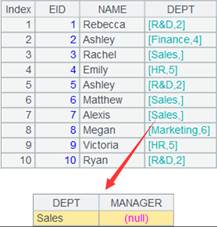
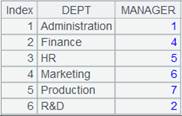
cs.switch(F i ,A i :x;… )
Description:
Attach the action of switching specified field values to the referencing record field values to a cursor and return the original cursor.
Syntax:
cs.switch(Fi,Ai:x;…)
Note:
The function attaches a computation to cursor cs, which will replace values of Fi field in cursor cs with the corresponding records in Ai, and returns the original cursor cs. x is the primary key or logical primary key of Ai, and the matching condition is Fi =x. By default, an Fi field value is displayed as empty when no record in Ai can match it.
This is a delayed function.
Parameter:
|
cs |
A cursor/A multicursor. |
|
Fi |
A field of a cursor. |
|
Ai |
A table sequence/A record sequence. |
|
x |
The primary key or logical primary key of Ai; the parameter can be omitted if primary key is already set for Ai. |
|
@i |
Delete Ai records that do not have a matching Fi field value. |
|
@d |
Perform the inverse operation of @i to obtain cursor records that have no matching value Ai for F field. |
|
@1 |
If the Fi field value of a record in channel ch doesn’t exist in Ai, then generate a record of the same structure as Ai with expression Fi being the primary key. Here is number 1. |
Return value:
Cursor
Example:
When x is the primary key of Ai:
|
|
A |
|
|
1 |
=demo.cursor("SELECT top 5 EID,DEPT,NAME FROM EMPLOYEE") |
Return a cursor whose data is as follows:
|
|
2 |
=demo.query("SELECT DEPT,MANAGER FROM DEPARTMENT").keys(DEPT) |
Return a table sequence whose key is DEPT:
|
|
3 |
=A1.switch(DEPT,A2) |
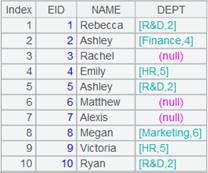
Attach a computation to cursor A1, which will replace DEPT values to A2’s records pointed by the referencing field in the cursor, and return cursor A1; as A2’s key is DEPT, parameter x can be omitted. |
|
4 |
=A1.fetch() |
Fetch data from cursor A1 where A3’s computation is executed:
|
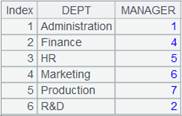
When x isn’t the primary key or logical key of Ai:
|
|
A |
|
|
1 |
=demo.cursor("SELECT top 10 EID,DEPT,NAME FROM EMPLOYEE") |
Return a cursor whose data is as follows:
|
|
2 |
=demo.query("SELECT top 6 DEPT,MANAGER FROM DEPARTMENT") |
Return a table sequence:
|
|
3 |
=A1.switch(DEPT,A2:DEPT) |
Attach a computation to cursor A1, which will match cursor A1’s DEPT field with corresponding DEPT field in table sequence A2 and display the non-matching values as nulls, and return cursor A1. |
|
4 |
=A1.fetch() |
Fetch data from cursor A1 where A3’s computation is executed:
|
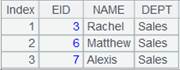
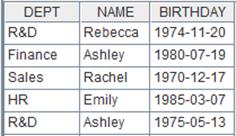
Use @i option to delete non-matching records:
|
|
A |
|
|
1 |
=demo.cursor("SELECT top 10 EID,DEPT,NAME FROM EMPLOYEE") |
Return a cursor whose data is as follows:
|
|
2 |
=demo.query("SELECT top 6 DEPT,MANAGER FROM DEPARTMENT") |
Return a table sequence:
|
|
3 |
=A1.switch@i(DEPT,A2:DEPT) |
Attach a computation to cursor A1, which will match cursor A1’s DEPT field with corresponding DEPT field in table sequence A2 and, with @i option, delete the non-matching records, and return cursor A1. |
|
4 |
=A1.fetch() |
Fetch data from cursor A1 where A3’s computation is executed:
|

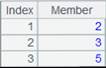
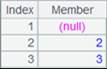
Use @d option to keep the non-matching records only:
|
|
A |
|
|
1 |
=demo.cursor("SELECT top 10 EID,DEPT,NAME FROM EMPLOYEE") |
Return a cursor whose data is as follows:
|
|
2 |
=demo.query("SELECT top 6 DEPT,MANAGER FROM DEPARTMENT") |
Return a table sequence:
|
|
3 |
=A1.switch@d(DEPT,A2:DEPT) |
Attach a computation to cursor A1, which will match cursor A1’s DEPT field with corresponding DEPT field in table sequence A2 and, with @d option, retain the non-matching records only, and return cursor A1. |
|
4 |
=A1.fetch() |
Fetch data from cursor A1 where A3’s computation is executed:
|
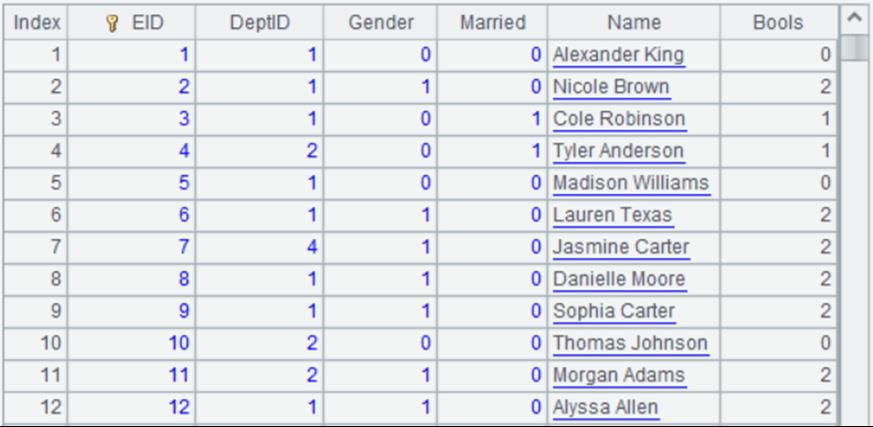
When @1 option works:
|
|
A |
|
|
1 |
=demo.cursor("SELECT top 10 EID,DEPT,NAME FROM EMPLOYEE") |
Return a cursor whose data is as follows:
|
|
2 |
=demo.query("SELECT top 6 DEPT,MANAGER FROM DEPARTMENT") |
Return a table sequence:
|
|
3 |
=A1.switch@1(DEPT,A2:DEPT) |
Attach a computation to cursor A1, which will match cursor A1’s DEPT field with corresponding DEPT field in table sequence A2 and, with @1 option, generate a record of same structure as A2 when the current value does not match, and return cursor A1. |
|
4 |
=A1.fetch() |
Fetch data from cursor A1 where A3’s computation is executed:
|
Related function:
Description:
Replace values of a specified field in a cluster cursor with the corresponding referencing records in another table.
Syntax:
cs.switch(Fi,Ai:x;…)
Note:
The function replaces a value of Fi field in cursor/multicursor/cluster cursor cs with the corresponding record in Ai by matching the Fi value with parameter x, which is the primary key or logical primary key of Ai. An Fi field value displays as empty when no record in Ai matches it.
Only supported by esProc Enterprise Edition.
Parameter:
|
cs |
A cursor/multicursor/cluster cursor. |
|
Fi |
A field in the cursor. |
|
Ai |
A cluster in-memory table. |
|
x |
The primary key or logical primary key of Ai; the parameter can be omitted if primary key is already set for Ai. |
Option:
|
@c |
With a distributed cluster in-memory table, the operation won’t involve a cross-node reference but it assumes that the referenced records are local. |
Return value:
The original cursor
Example:
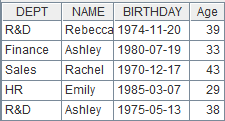
T.switch( Fi, T’ :x;… )
Define a field value switching operation on a pseudo table and return a new pseudo table.
Syntax:
T.switch(Fi,T’:x;…)
Note:
The function defines an operation on pseudo table T: replace values of T’s Fi field with corresponding records of table sequence/in-memory pseudo table T’ by matching Fi field value with parameter x, which is T’’s primary key, and returns a new pseudo table.
By default, display Fi field value as null when no record in Ai matches it.
Only supported by esProc Enterprise Edition.
Parameter:
|
T |
A pseudo table. |
|
Fi |
A pseudo table field. |
|
T’ |
A table sequence/in-memory pseudo table. |
|
x |
The primary key or logical key of T’; the parameter can be omitted if primary key is already set for T’. |
Option:
|
@i |
Delete the whole T’ record without a matching value in Fi. |
|
@d |
Perform the inverse operation of @i to obtain pseudo table records that have no matching value in Ai for F field. |
|
@1 |
If the F field value of a pseudo table record doesn’t exist in T’, then generate a record of the same structure as T’ with expression x being the primary key. |
Return value:
Pseudo table
Example:
|
|
A |
B |
|
|
1 |
=create(file).record(["emp_news.ctx"]) |
|
Below is content of composite table emp_news.ctx:
|
|
2 |
=pseudo(A1) |
|
Generate a pseudo table from the composite table. |
|
3 |
=demo.query("SELECT top 4 * FROM DEPARTMENT").keys(DEPT) |
|
Return a table sequence and set DEPT field as its primary key:
|
|
4 |
=A2.switch(DEPT,A3) |
=A4.import() |
Execute expression in A4 to define a computation on A2’s pseudo table, which will convert its DEPT field values into corresponding referencing field values in table sequence A3, and retrun a new pseudo table. Execute expression in B4: import data from A4’s pseudo table while executing the computation deinfed in A4 on A2’s pseudo table, and return the following table:
|
|
5 |
=A2.switch@i(DEPT,A3) |
=A5.import() |
Use @i option to delete pseudo table records that can’t be matched; execute B5 and return the following table:
|
|
6 |
=A2.switch@d(DEPT,A3) |
=A6.cursor().fetch() |
Use @d option to retain only the non-matching records in the pseudo table; execute B6 and return the following table:
|
|
7 |
=A7.cursor().fetch() |
Use @1 option to generate a record having same structure as table sequence A3 when a DEPT value of the pseudo table does not have a match in A3 and using DEPT as the primary key; execute B7 and return the following table:
|
|
|
8 |
=pseudo([{file:"dmp.btx",key:"keys(DEPT)"}]) |
|
Use the bin file to define an in-memory pseudo table that uses DEPT as the primary key. Its data is as follows:
|
|
9 |
=A2.switch(DEPT,A8) |
=A9.import() |
Same as B4. |