pseudo()
Here are how to use pseudo() functions.
pseudo()
Description:
Generate a pseudo table definition object.
Syntax:
pseudo(pd,n)
Note:
The function generates a pseudo table definition object by specifying the definition record pd. By setting up parameter n, you can get a multicursor from the pseudo table object; n is the number of subcursors in a multicursor.
Only supported by esProc Enterprise Edition.
Parameter:
Option:
|
@v |
Use pure-table-sequence based column-wise computation on a pseudo table generated from a composite table. |
Return value:
Pseudo table object/In-memory pseudo table object
Example:
When data source of the pseudo table is a composite table:
|
|
A |
|
|
1 |
=[{file:" D:/file/pseudo/app.ctx "}] |
Create a pseudo table definition record, where the pseudo table’s data source is a composite table. |
|
2 |
=pseudo(A1) |
Generate a pseudo table object. |
|
3 |
=A2.import() |
Get a table sequence from the pseudo table. |
Source of pseudo table data is a bin file:
|
|
A |
|
|
1 |
=create(file,key).record(["emp.btx","keys@t(EID,BIRTHDAY)"]) |
Create pseudo table definition: use a bin file as the source of pseudo table data, define EID as the pseudo table’s base key and BIRTHDAY as the time key. |
|
2 |
=pseudo(A1) |
Generate a pseudo table object. |
|
3 |
=A2.import() |
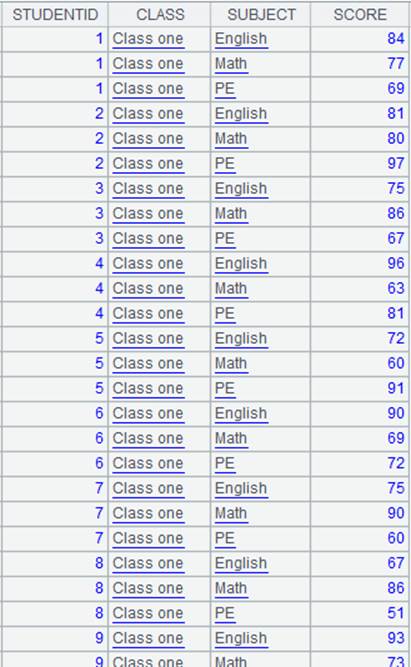
Extract a table sequence from the pseudo table:
|
When data source of the pseudo table is a multizone composite table:
|
|
A |
|
|
1 |
=create(file,zone).record(["pseudo/OrderInfo.ctx",[1,2]]) |
Create a pseudo table definition record, where the pseudo table’s data source is a multizone composite table; OTime field in the two zone tables 1.OrderInfo.ctx and 1.OrderInfo.ctx is time type; the field corresponds data in the year 2020 and 2021. |
|
2 |
=pseudo(A1) |
Generate a pseudo table object. |
|
3 |
=A2.select(OTime>date(2020,12,20)) |
Filter data in the pseudo table and the program automatically gets data from the corresponding zone table. |
|
4 |
=A3.import() |
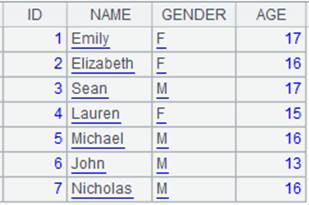
Return the filtering result as a table sequence. |
Set parameter n:
|
|
A |
|
|
1 |
=create(file).record(["emp.ctx"]) |
|
|
2 |
=pseudo(A1,3) |
Generate a pseudo table object where parameter n is 3. |
|
3 |
=A2.cursor() |
Get a multicursor having 3 subcursors from the pseudo table. |
When using @v option:
|
|
A |
|
|
1 |
=create(file).record(["Emp.ctx"]) |
|
|
2 |
=pseudo@v(A1) |
Generate a pseudo table object from a composite table and use @v option to enable pure-table-sequence-based, column-wise computation. |
|
3 |
=A2.cursor() |
Generate a column-wise cursor. |
|
4 |
=A2.import() |
Generate a pure table sequence. |
|
5 |
=A2.memory() |
Generate a column-wise, in-memory table. |
For an in-memory pseudo table:
|
|
A |
|
|
1 |
>tab=demo.query("select * from CITIES") |
Get CITIES table and store it in variable tab. |
|
2 |
=create(var).record([tab]) |
Use an in-memory table to define an in-memory pseudo table. |
|
3 |
=pseudo(A2) |
Generate an in-memory pseudo table object. |
|
4 |
=A3.select(STATEID==3) |
Get the information where STATEID is 3 from the pseudo table. |
|
5 |
=A4.import() |
|
|
6 |
=[{file:"stu.btx",key:"keys(Class,Name)"}] |
Use the bin file to define an in-memory pseudo table, where Class and Name are the primary key fields. |
|
7 |
=pseudo(A6) |
Generate an in-memory pseudo table object. |
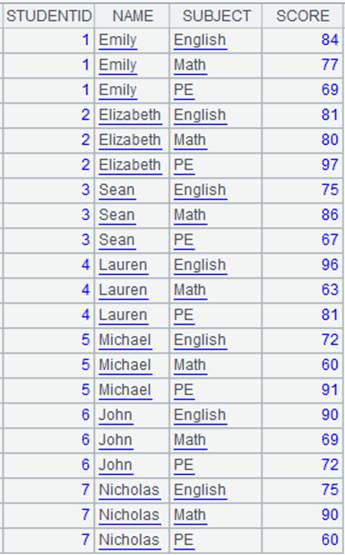
Define pseudo table’s user-defined fields:
Below is data in emps.ctx:
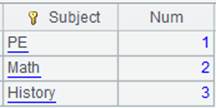
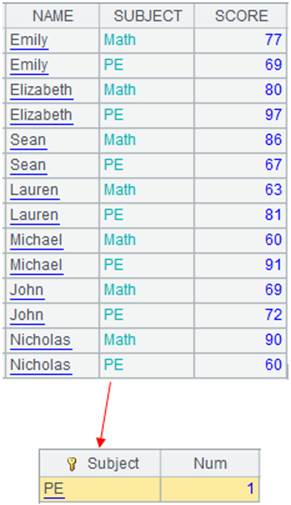
In the data file, the range of DeptID field values is 1-5, which corresponds to five departments – Sales, Technology, R&D, Financial and Admin.
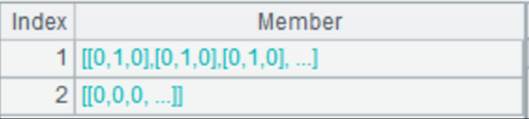
Bools field stores data of two binary fields – Gender and Married. In field Gender, 0 represents male and 1 represents female; In field Married, 0 represents single and 1 represents married. Bools field values are results of computing bits(Gender,Married).
|
|
A |
|
|
1 |
=create(file,column).record(["pseudo/emps.ctx",[{name:"DeptID",enum:"Dept",list:["Sales","Technology","R&D","Financial","Admin"]}, {name:"Bools",bits:["IfMarried","IfLady"]}]]) |
Create a pseudo table definition record, which contains a enumerated pseudo field Dept and a binary dimension pseudo field.
|
|
2 |
=pseudo(A1) |
Generate a pseudo table object. |
|
3 |
=A2.import(DeptID,Dept) |
DeptID field values 1-5 correspond to ["Sales","Technology","R&D","Financial","Admin"] respectively.
|
|
4 |
=A2.import(Gender,Married,IfMarried,IfLady) |
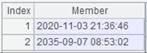
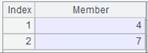
View the correspondence between Gender/Married and IfLady/IfMarried:
|
Define pseudo table’s user-defined fields – the redundant field:
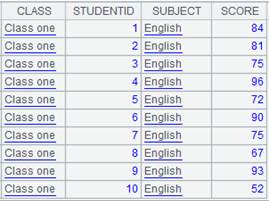
Below is data of Details.ctx:
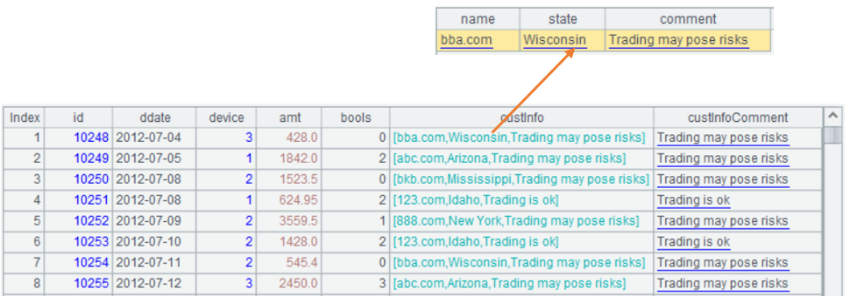
custInfoComment is a redundant field that stores values of custInfo.comment field:
|
|
A |
|
|
1 |
=create(file,column).record(["pseudo/Details.ctx",[{name:"custInfoComment",exp:"custInfo.comment"}]]) |
Define
exp:"custInfo.comment" for the pseudo table and its corresponding
real field custInfoComment. |
|
2 |
=pseudo(A1) |
Generate a pseudo table object. |
|
3 |
=A2.select(pos(custInfo.comment,"risk")) |
As the filtering condition contains an expression, instead of retrieving custInfo records and then their fields, custInfo will be replaced by the real field custInfoComment. |
|
4 |
=A3.import() |
Import the filttering result.
|
|
5 |
=file("pseudo/details_new.btx").cursor@b(id,ddate,device,amt,bools,custInfo) |
Below is data of details_new.btx:
|
|
6 |
=A2.append(A5) |
Append A5’s data to A2, during which the program will automatically convert and generate custInfoComment |
|
7 |
=A3.import() |
Data of details.ctx after data appending:
|

Define pseudo table’s user-defined fields – field aliases:
Below is data of Events.ctx:

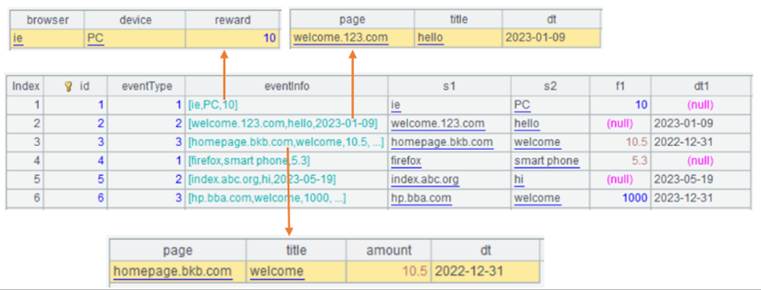
Each row of data is an event. Each event stores eventType and the corresponding property information eventInfo.
eventType field values are 1-3, which correspond to appInstall, appStart and append.
eventInfo contains records that also contain multiple fields for storing different properties.
s1, s2, f1 and dt1 are real fields that store the properties of the three types of events. s1 stores three string properties of the three types of events – browser, page and page; s2 stores three string properties of the three types of events – device, title and title; f1 stores two numeric properties – reward and amount, for appInstall event and append event; dt1 stores two datetime properties – dt and dt for appInstall event and append event.
|
|
A |
|
|
1 |
=create(file,column).record(["pseudo/Events.ctx",[{name:"eventType",alias:null,enum:"eventTypeString",list:["appInstall","appStart","appEnd"],exp:null}, {name:"s1",alias:["browser","appStart_page","appEnd_page"],enum:null,list:null,exp:"case(eventType,1:eventInfo.browser,2:eventInfo.page,3:eventInfo.page)"}, {name:"s2",alias:["device","appStart_title","appEnd_title"],enum:null,list:null,exp:"case(eventType,1:eventInfo.device,2:eventInfo.title,3:eventInfo.title)"}, {name:"f1",alias:["reward","amount"],enum:null,list:null,exp:"case(eventType,1:eventInfo.reward,3:eventInfo.amount)"}, {name:"dt1",alias:["appStart_dt","appEnd_dt"],enum:null,list:null,exp:"case(eventType,2:eventInfo.dt,3:eventInfo.dt)"}]]) |
Configure multiple aliases having business meanings for each real field in the pseudo table definition. Three aliases of real field s1: "browser","appStart_page","appEnd_page", and their corresponding expressions: exp:"case(eventType, 1:eventInfo.browser, 2: eventInfo.page, 3: eventInfo.page)". If value of eventType isn't 1, 2 or 3,value of real field s1 should be null. Therefore, here the code should not be case(eventType, 1:eventInfo.browser;eventInfo.page). It is similar to configure aliases for s2, f1 and dt1. |
|
2 |
=pseudo(A1) |
Generate a pseudo table object. |
|
3 |
=A2.select(eventTypeString=="appInstall" && browser=="firefox") |
There is a field alias in the filter condition, so SPL won't first retrieve eventInfo records and then their fields; rather, it automatically replaces it with the real field s1 and uses values of the redundant field to peform the subsequent computations. |
|
4 |
=A3.import(id,eventTypeString,browser,reward) |
Get the filter result
|
|
5 |
=file("pseudo/events_new.btx").cursor@b(id,eventTypeString,eventInfo) |
Below is data in events_new.btx:
|
|
6 |
=A2.append(A5) |
Append data, during which the system automatically generate s1, f1 and other fields according to eventTypeString and eventInfo. |
|
7 |
=A2.import() |
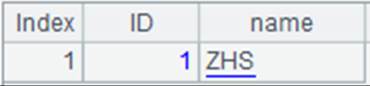
Events.ctx with appened data:
|


Ø Define a user-defined field in pseudo table – how to use data transfer type pseudo field
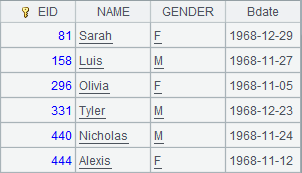
Below is data in emdate.ctx, where Birdays field values are result of performing days@o() operation on date type data:
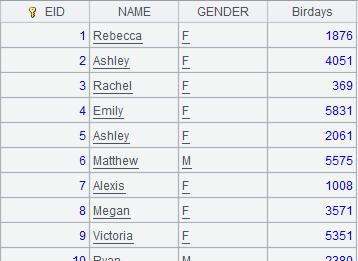
Look at how to use data transfer type pseudo field:
|
|
A |
|
|
1 |
=create(file,column).record(["emdate.ctx", [{name:"Birdays",date:"Bdate"}]]) |
Create a pseudo table definition record: use emdate.ctx as source of pseudo table data, define a date conversion type pseudo field named Bdate and whose corresponding real field is Birdays:
|
|
2 |
=pseudo(A1) |
Generate a pseudo table object. |
|
3 |
=A2.import() |
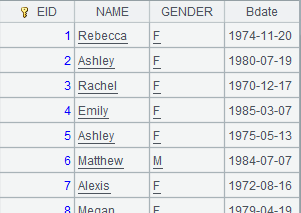
Extract a table sequence from the pseudo table, where Bdate is the pseudo field:
|
|
4 |
=A2.select(Bdate<date("1969-01-01")) |
Filter pseudo table records through the pseudo field to select those where Bdate values are less than 1969-01-01 and return them to the new pseudo table. |
|
5 |
=A4.import() |
Retrieve data from A4’s pseudo table:
|
T.pseudo(T ’ ,…)
Segment a pseudo table according to the segmentation way of another.
Syntax:
T.pseudo(T’,…)
Note:
The function sets up pseudo table T’,…, which should be a pseudo table object from which a multicursor can be obtained, according to pseudo table T. The former is segmented the same way as the latter.
Only supported by esProc Enterprise Edition.
Parameter:
|
T |
A segmented pseudo table object. |
|
T’ |
A pseudo table object. |
Example:
|
|
A |
|
|
1 |
=create(file).record(["emp1.ctx"]) |
|
|
2 |
=pseudo(A1,3) |
Generate a pseudo table object having 3 subcursors from a composite table. |
|
3 |
=create(file).record(["emp2.ctx"]) |
|
|
4 |
=pseudo(A3,5) |
Generate a pseudo table object, with the number of subcursorss being 5. |
|
5 |
=A2.pseudo(A4) |
Segment pseudo table A4 the same way as pseudo table A2. |
|
6 |
=A4.cursor() |
Get a multicursor having 3 subcursors from pseudo table A4. |