report_export()
Description:
Export a report/report group file.
Syntax:
report_export(rpt, filePath)
Note:
The Report5Cli external library function (See The Programmer’s Reference) exports a report as a pdf, docx, btx, xlsx/xls, html/mht or rpr file; rpr file is the default.
The function only supports @p, @d, @x, @h, and @b when exporting a report group file.
Parameter:
|
rpt |
A report object. |
|
filePath |
The URL through which a report is exported, which can be an absolute path or a relative path; When it is the relative path, the base directory is the path specified in esProc main directory’s < mainPath > node in the configuration file. |
Option:
|
@p |
Export as a pdf file, paginated by default. |
|
@d |
Export as a docx file. |
|
@x |
Export as an xlsx file, paginated by default. |
|
@h |
Export as an html file. |
|
@n |
Export as a non-paginated file; need to work with @p or @x. |
|
@s |
Export as an xls file; need to work with @x. |
|
@m |
Export as an mht file; need to work with @h. |
|
@f |
Export as an Excel file with formulas; need to work with @x or @xs. |
|
@b |
Export as a btx file. |
|
@t |
Export the first row as column headers, named col1, col2,… by default. Only valid when working with @b. |
Return value:
Report file export path
Example:
|
|
A |
|
|
1 |
>report_config("config\\raqsoftConfigReport.xml") |
|
|
2 |
=report_open("D:\\test.rpx") |
|
|
3 |
=report_run(A2) |
|
|
4 |
=report_export@d(A2,"D:\\test.docx") |
Export as test.docx. |
|
5 |
=report_export@d(A2," D:\\test ") |
Same as above; automatically export as a docx file when the file extension is absent. |
|
6 |
=report_export@p(A2,"D:\\test") |
Export as a paginated test.pdf. |
|
7 |
=report_export@xn(A2,"D:\\test") |
Export as a non-paginated test.xlsx. |
|
8 |
=report_export@xsf(A2,"D:\\test") |
Export as test.xls with formulas. |
|
9 |
=report_export@hm(A2,"D:\\test") |
Export as test.mht. |
|
10 |
=report_export(A2,"D:\\test") |
Export as test.rpr. |
|
11 |
=report_export@pdxh(A2,"D:\\test") |
Export as a paginated test.pdf; order of priorities of the options is @p>@d>@x>@h. |
|
12 |
=report_export@b(A2,"D:\\test") |
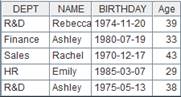
Export report as test.btx, where column headers are col1, col2….
|
|
13 |
=report_export@bt(A2,"D:\\test") |
Export the first row as column headers.
|