words()
Here’s how to use words() functions.
s. words()
Description:
Extract English letter strings from a string.
Syntax:
s.words()
Note:
The function returns a string sequence consisting of English letters extracted from string s while other characters are ignored if no options are present.
Option:
|
@d |
Extract digits from a string. |
|
@a |
Extract both English letter strings and substrings of digits from a string. |
|
@c |
Extract English letter strings, numeric strings and Chinese characters from a string. |
|
@w |
Extract all characters: a string in Chinese /a sign will be extracted as individual characters and a string of English letters/a number as words. |
|
@p |
Use with @w option to identify the beginning part of a number or a datetime data as a part of it. |
|
@i |
Treat continuous English letters plus underline or numeric characters as a whole. Note that an English word should not begin with a numeric character. Include continuous Chinese characters when this option works with @c option. |
Parameter:
|
s |
A string. |
Return value:
A sequence of strings
Example:
|
|
A |
|
|
1 |
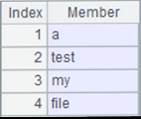
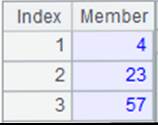
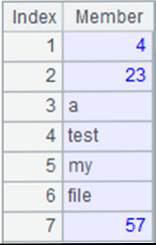
4,23,a,test?my_file 57 |
|
|
2 |
=A1.words() |
Extract English letter strings from the string:
|
|
3 |
=A1.words@d() |
Extract digits form the string:
|
|
4 |
=A1.words@a() |
Extract English letter strings and digits form the string:
|
Extract every character:
|
|
A |
|
|
1 |
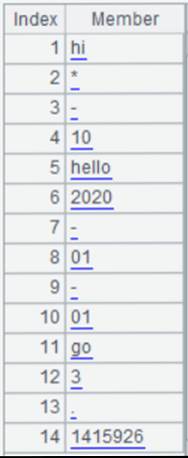
hi*-10hello2020-01-01go3.1415926 |
|
|
2 |
=A1.words@w() |
Extract every character by making each Chinese character and symbol a single character and combining English letters and numbers as a word or a whole:
|
|
3 |
=A1.words@wp() |
Identify a continuous string of numeric characters of as a number of a date according to the data type of the first character and extract them as a whole, such as -10, 2020-01-01 and 3.1415926:
|
Extract words:
|
|
A |
|
|
1 |
ab_c你12_3好吗_#?_df34 |
|
|
2 |
=A13.words@i() |
Extract continuous English letters plus underline and digits as a whole:
|
When string s contains Chinese characters:
|
|
A |
|
|
1 |
abc你123好吗c#?df34 |
|
|
2 |
=A1.words() |
Only extract English letter strings as no options are present:
|
|
3 |
=A1.words@a() |
Use @a option to extract English letter strings and numeric strings:
|
|
4 |
=A1.words@c() |
Use @c option to extract English letter strings, numeric strings and Chinesee charactrers:
|
|
5 |
=A1.words@i() |
Use @i option to treat continuous English letters and numbers as a whole:
|
|
6 |
=A1.words@ic() |
The presence of options @ic enables treating continusous English letters, numbers and Chinese characters as a whole:
|