T.switch( Fi, T’ :x;… )
Define a field value switching operation on a pseudo table and return a new pseudo table.
Syntax:
T.switch(Fi,T’:x;…)
Note:
The function defines an operation on pseudo table T: replace values of T’s Fi field with corresponding records of table sequence/in-memory pseudo table T’ by matching Fi field value with parameter x, which is T’’s primary key, and returns a new pseudo table.
By default, display Fi field value as null when no record in Ai matches it.
Only supported by esProc Enterprise Edition.
Parameter:
|
T |
A pseudo table. |
|
Fi |
A pseudo table field. |
|
T’ |
A table sequence/in-memory pseudo table. |
|
x |
The primary key or logical key of T’; the parameter can be omitted if primary key is already set for T’. |
Option:
|
@i |
Delete the whole T’ record without a matching value in Fi. |
|
@d |
Perform the inverse operation of @i to obtain pseudo table records that have no matching value in Ai for F field. |
|
@1 |
If the F field value of a pseudo table record doesn’t exist in T’, then generate a record of the same structure as T’ with expression x being the primary key. |
Return value:
Pseudo table
Example:
|
|
A |
B |
|
|
1 |
=create(file).record(["emp_news.ctx"]) |
|
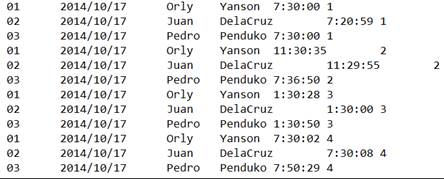
Below is content of composite table emp_news.ctx:
|
|
2 |
=pseudo(A1) |
|
Generate a pseudo table from the composite table. |
|
3 |
=demo.query("SELECT top 4 * FROM DEPARTMENT").keys(DEPT) |
|
Return a table sequence and set DEPT field as its primary key:
|
|
4 |
=A2.switch(DEPT,A3) |
=A4.import() |
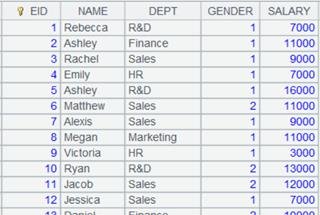
Execute expression in A4 to define a computation on A2’s pseudo table, which will convert its DEPT field values into corresponding referencing field values in table sequence A3, and retrun a new pseudo table. Execute expression in B4: import data from A4’s pseudo table while executing the computation deinfed in A4 on A2’s pseudo table, and return the following table:
|
|
5 |
=A2.switch@i(DEPT,A3) |
=A5.import() |
Use @i option to delete pseudo table records that can’t be matched; execute B5 and return the following table:
|
|
6 |
=A2.switch@d(DEPT,A3) |
=A6.cursor().fetch() |
Use @d option to retain only the non-matching records in the pseudo table; execute B6 and return the following table:
|
|
7 |
=A7.cursor().fetch() |
Use @1 option to generate a record having same structure as table sequence A3 when a DEPT value of the pseudo table does not have a match in A3 and using DEPT as the primary key; execute B7 and return the following table:
|
|
|
8 |
=pseudo([{file:"dmp.btx",key:"keys(DEPT)"}]) |
|
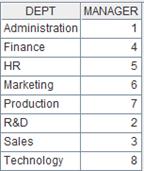
Use the bin file to define an in-memory pseudo table that uses DEPT as the primary key. Its data is as follows:
|
|
9 |
=A2.switch(DEPT,A8) |
=A9.import() |
Same as B4. |