T.pjoin ()
Description:
Create an association between a pseudo table and a table sequence/in-memory pseudo table through the join key.
Syntax:
T.pjoin(K:..,x:F,…; T’:z,Ki:…,xi:Fi,…; …)
Note:
The function associates pseudo table T and table sequence/in-memory pseudo table T’ through the join key and returns a new pseudo table consisting of x:F,… and xi:Fi,….
By default, x:F,… involves all fields of T; both T and T’ should be ordered by the join key.
When relationship between T and T’ is one-to-many, xi is an aggregate expression.
When relationship between T and T’ is many-to-one, records of T’ will appear repeatedly in the result set.
Parameter z specifies the join type. It can be absent or null. Perform an inner join when z is absent, and a left join when z is null; and only retain records of T that cannot find matches when z is null and both parameters xi:Fi are absent.
Only supported by esProc Enterprise Edition.
Parameter:
|
T |
A pseudo table. |
|
K |
T’s join key. |
|
x |
T’s expression. |
|
F |
Field name corresponding to expression x. |
|
T’ |
A table sequence/in-memory pseudo table. |
|
z |
Join type. |
|
Ki |
Join key of T’. |
|
xi |
Expression of T’. |
|
Fi |
Field name corresponding to expression xi. |
Return value:
Pseudo table
Option:
|
@f |
Enable full join while ignoring parameter z; do not work with @r. |
Example:
Multi-homo-dimension table join:
|
|
A |
|
|
1 |
=create(file).record(["statename-pj.ctx"]) |
Below is content of statename-pj.ctx, which is ordered by STATEID:
|
|
2 |
=pseudo(A1) |
Generate a pseudo table from the composite table. |
|
3 |
=connect("demo").query("select STATEID,POPULATION from STATEINFO").sort(STATEID) .cursor() |
Return a cursor ordered by STATEID. Its data is as follows:
|
|
4 |
=connect("demo").query("select STATEID,CAPITAL from STATECAPITAL").sort(STATEID) |
Return a record sequence ordered by STATEID.
|
|
5 |
=A2.pjoin(STATEID,STATEID:ID,NAME;A3,STATEID,POPULATION;A4,STATEID,CAPITAL) |
Define a computation on A2’s pseudo table, which will create association between the pseudo table and cursor A3 and A4 through join key STATEID, and rename STATEID ID, and return a new pseudo table.
|
|
6 |
=A5.cursor().fetch() |
Fetch data from A5’s pseudo table while executing the computation defined in A5 on A2’s pseudo table, and return the following table:
|
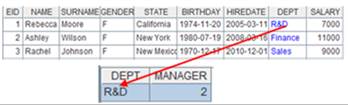
When T and csi has a one-to-many relationship:
|
|
A |
|
|
1 |
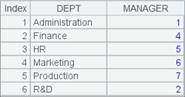
=create(file).record(["dep-pj.ctx"]) |
Below is content of composite table dep-pj.ctx, which is ordered by DEPT:
|
|
2 |
=pseudo(A1) |
Generate a pseudo table from the composite table. |
|
3 |
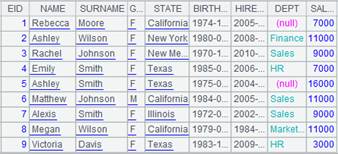
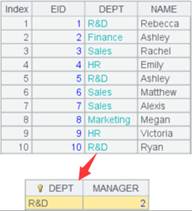
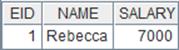
=pseudo([{file:"emp.btx",key:"keys(EID)"}] |
Return an in-memory pseudo table that is
defined based on the btx file, uses EID as the primary key, and is ordered by
DEPT field. Its data is as follows: |
|
4 |
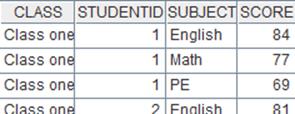
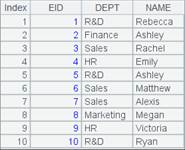
=A2.pjoin(DEPT;A3,DEPT,count(EID):Num) |
Pseudo table A2 and cursor A3 have a one-to-many relationship; define a computation on A2’s pseudo table, which will associate them through DEPT, find the number of EID values under each DEPT value and make the computing results a new field Num, and return a new pseudo table.
|
|
5 |
=A4.import() |
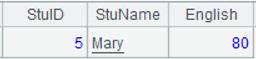
Fetch data from A4’s pseudo table while executing the computation defined in A4 on A2’s pseudo table, and return the following table:
|
When T and csi has a many-to-one relationship:
|
|
A |
|
|
1 |
=create(file).record(["cities-pj.ctx"]) |
Below is content of composite table cities-pj.ctx, which is ordered by STATEID:
|
|
2 |
=pseudo(A1) |
Generate a pseudo table from the composite table. |
|
3 |
=pseudo(create(file).record(["empj.ctx"])) |
Return a pseudo table defined based on the composite table and below is the content:
|
|
4 |
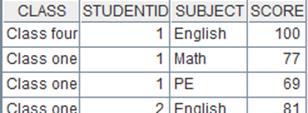
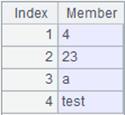
=A2.pjoin(STATEID,CID,NAME,POPULATION;A3,STATEID,CAPITAL ) |
Pseudo table A2 and cursor A3 have a many-to-one relationship; define a computation on A2’s pseudo table, which will associate them through STATEID, during which A2’s field values appear in the result set repeatedly, and return a new pseudo table.
|
|
5 |
=A4.import() |
Fetch data from A4’s pseudo table while executing the computation defined in A4 on A2’s pseudo table, and return the following table:
|
Full join:
|
|
A |
|
|
1 |
=create(file).record(["cities-pj.ctx"]) |
Composite table cities-pj.ctx is ordered by STATEID; its content is as follows:
|
|
2 |
=pseudo(A1) |
Generate a pseudo table from the composite table. |
|
3 |
=connect("demo").cursor("SELECT top 20 STATEID,CAPITAL FROM STATECAPITAL").sortx(STATEID) |
Return a cursor; content is as follows:
|
|
4 |
=A2.pjoin@f(STATEID,CID,NAME,POPULATION;A3,STATEID,CAPITAL ) |
Define a computation on A2’s pseudo table – with @f option, perform a full join to display record field values that do not have matches as nulls, and return a new pseudo table.
|
|
5 |
=A4.import() |
Fetch data from A4’s pseudo table while executing the computation defined in A4 on A2’s pseudo table, and return the following table:
|

Method 1 for left join:
|
|
A |
|
|
1 |
=create(file).record(["cities-pj.ctx"]) |
Composite table cities-pj.ctx is ordered by STATEID; its content is as follows:
|
|
2 |
=pseudo(A1) |
Generate a pseudo table from the composite table. |
|
3 |
=connect("demo").cursor("SELECT top 20 STATEID,CAPITAL FROM STATECAPITAL").sortx(STATEID) |
Return a cursor whose data is as follows:
|
|
4 |
=A2.pjoin(STATEID,CID,NAME,POPULATION;A3:null,STATEID,CAPITAL ) |
Define a computation on A2’s pseudo table – as parameter z is null, perform a left join to list all records of the pseudo table and display field values that do not match A3 as nulls – and return a new pseudo table. |
|
5 |
=A4.import() |
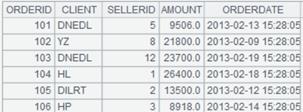
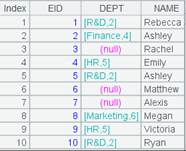
Fetch data from A4’s pseudo table while executing the computation defined in A4 on A2’s pseudo table, and return the following table:
|
Method 2 for left join:
|
|
A |
|
|
1 |
=create(file).record(["cities-pj.ctx"]) |
Composite table cities-pj.ctx is ordered by STATEID; its content is as follows:
|
|
2 |
=pseudo(A1) |
Generate a pseudo table from the composite table |
|
3 |
=connect("demo").cursor("SELECT top 20 STATEID,CAPITAL FROM STATECAPITAL").sortx(STATEID) |
Return a cursor; its content is as follows:
|
|
4 |
=A2.pjoin(STATEID;A3:null,STATEID) |
Define a computation on A2’s pseudo table – as parameter z is null and parameters xi:Fi are absent, only retain pseudo table records that do not have matches, and return a new pseudo table.
|
|
5 |
=A2.import() |
Fetch data from A2’s pseudo table while executing the computation defined in A3 on A2’s pseudo table, and return the following table:
|