T.new()
Description:
Define an operation of computing field values on a pseudo table and return a new pseudo table.
Syntax:
T.new(xi:Fi,…)
Note:
The function defines an operation on pseudo table T – compute expression xi on each record of T, and generates a new pseudo table having the same number of records as T, consisting of fields Fi whose values are xi.
Parameter:
|
T |
A pseudo table. |
|
xi |
An expression, whose result will be field values; the corresponding field value will be null if it is absent. When the parameter is absent, : Fi after it should still be in place. When # is written at its position, the symbol denotes the sequence number for locating the corresponding member. |
|
Fi |
The fields(s) of the new pseudo table. When the parameter is absent, use the identifiers parsed from expression xi. |
Option:
|
@i |
When parameter xi is present and its value is null, do not generate a corresponding record. |
Return value:
Pseudo table
Example:
|
|
A |
|
|
1 |
=score=connect("demo").query("select top 5 * from SCORES where SCORE<60") |
|
|
2 |
=create(var).record([score]) |
|
|
3 |
=pseudo(A2) |
Define an in-memory pseudo table. |
|
4 |
=A3.import() |
Retrieve data from A3’s pseudo table:
|
|
5 |
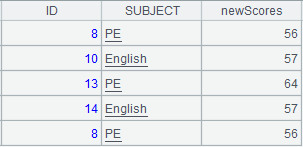
=A3.new(#2:ID,SUBJECT,SCORE+5:newScores) |
Define operations on A3’s pseudo table – #2:ID means renaming the 2nd field of A3’s pseudo table ID, compute expression SCORE+5 on SCORE field and rename the field newScores, and return a new pseudo table made up of ID field, SUBJECT field and newScores field. |
|
6 |
=A5.import() |
Retrieve data from A5’s pseudo table:
|
When @i option works:
|
|
A |
|
|
1 |
=connect("demo").query("select * from DEPT") |
|
|
2 |
=create(var).record([A1]) |
|
|
3 |
=pseudo(A2) |
Define a pseudo table. |
|
4 |
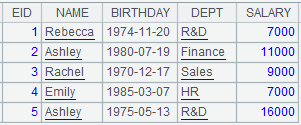
=A3.import() |
Retrieve data from A3’s pseudo table:
|
|
5 |
=A3.new@i(DEPTID,DEPTNAME,FATHER:father) |
With @i option, do not generate a corresponding record when the result of computing expression FATHER is null. |
|
6 |
=A5.import() |
Retrieve data from A5’s pseudo table:
|