T.index( f:h,w;C,…;F,… )
Description:
Create index file for an entity table.
Syntax:
T.index(f:h,w;C,…;F,…)
Note:
For records of entity table T that meets condition w, use column C,… as the key and create index file object f on it; the index file does not update itself accordingly when the composite table is updated (or reset).
Creating an index file requires the presence of column C,… and index file object f.
Field name of entity table T; the presence of F speeds up the query. When using the index file to retrieve data, get the indexed fields C,… and F field only; retrieve all fields when F is absent.
If parameter h is present and @w option is absent, create a HASH index file whose length his h; create a full-text index file when @w option works; create an ordered index file when both parameter h and @w option are absent. Parameter F should be absent if you need to create a HASH index or full-text index.
When T is an attached table, parameter C cannot be a field inherited from the primary table.
Parameter:
|
T |
An entity table. |
|
f |
Index file object. |
|
w |
Filtering condition; retrieve the whose set if the parameter is absent. |
|
C |
The field for which an index is created. |
|
h |
Hash index length; can be omitted. |
|
F |
Field name in an entity table; can be omitted. |
Option:
|
@2 |
Work when only parameter f is present; used to load the index file to the memory and can increase performance. |
|
@3 |
Work when only parameter f is present; used to load the index file to the memory; help achieve higher performance than @2 but occupy more memory space. |
|
@0 |
Close the index to release resources when only parameter f is present. |
|
@w |
Create a full-text index on column C, which should be a string type single column; Only support like("*X*") style search; X can be a string made up of letters, numbers or common characters, whose length should be greater than 2, or one or more Chinese characters; Case-insensitive when the index string is made up of letters; With this option, parameter h is interpreted as the largest number of records matched with each index string; no such interpretation when h is absent. |
Return value:
Entity table
Example:
Create an ordered index file:
|
|
A |
|
|
1 |
=demo.query("select EID,NAME,BIRTHDAY,DEPT,GENDER,HIREDATE,SALARY from employee ") |
Return a table sequence. |
|
2 |
=file("empi.ctx") |
|
|
3 |
=A2.create@y(#EID,NAME,BIRTHDAY,DEPT,GENDER,HIREDATE,SALARY) |
Create a composite table. |
|
4 |
=A3.append@i(A1) |
Append table sequence A1’s data to the composite table. |
|
5 |
=file("index_dzdpx") |
Create index file object. |
|
6 |
=A3.index(A5,DEPT=="HR";EID;DEPT) |
For data of EID and DEPT fields meeting DEPT=="HR" in composite table A3, create ordered index file index_dzdpx on EID, which is the indexed field. |
|
7 |
=file("index_px") |
Create index file object. |
|
8 |
=A3.index(A7;EID,NAME) |
Create index file index_px for composite table A3 on EID and NAME, which are indexed fields; as parameter F is absent, read all fields of the table. |
|
9 |
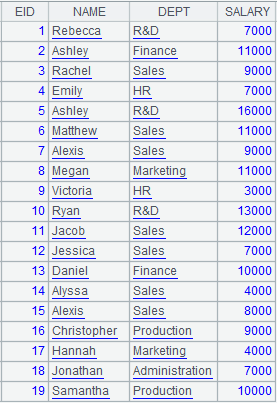
=A3.icursor(EID,NAME,DEPT,SALARY;EID<20;A7,A5) |
Query EID, NAME, DEPT and SALARY fields meeting EID<20 in the composite table according to the index file.
|
Create a HASH index file:
|
|
A |
|
|
1 |
=file("empi.ctx").open() |
Open the composite table. |
|
2 |
=file("index_hs") |
Create index file object. |
|
3 |
=A1.index(A2:10;DEPT,GENDER) |
Create a HASH index file whose length is 10 for composite table empi.ctx on DEPT and GENDER, which are the indexed fields. |
|
4 |
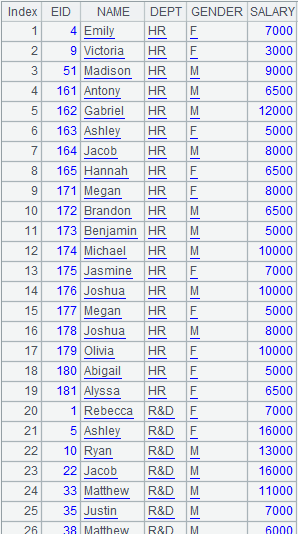
=A1.icursor(NAME,DEPT,GENDER,SALARY;[["HR","M"]].contain(DEPT,GENDER);A2) |
Use index file index_hs to query data of NAME, DEPT, GENDER and SALARY fields where DEPT is HR and GENDER is M in the composite table and return a cursor, whose content is as follows:
|
Create a full-text index file:
|
|
A |
|
|
1 |
=file("empi.ctx").open() |
Open the composite table file. |
|
2 |
=file("index_qw") |
Create index file object. |
|
3 |
=A1.index@w(A2;NAME) |
Use @w option to create a full-text index file for composite table empi.ctx on NAME which are the indexed field. |
|
4 |
=A1.icursor(EID,NAME,BIRTHDAY;like(NAME," *ann *");A2) |
Use index file index_qw to query data of EID, NAME and BIRTHDAY fields in the composite table where NAME values contain string “ann” and return result as a cursor, whose content is as follows:
|
|
5 |
=file("index_qw1") |
|
|
6 |
=A1.index@w(A5:5;NAME) |
Use @w to create a full-text index file, whre the index string is case-insensitive; the value of parameter h is 5 means the largest number of records each index string can match. |
|
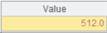
7 |
=A1.icursor(EID,NAME,BIRTHDAY;like(NAME,"*ANN*");A5) |
Content of the returned cursor is as follows:
|

Automatically load the composite table’s index file:
|
|
A |
|
|
1 |
=file("empi.ctx").open() |
Open the composite table file. |
|
2 |
=A1.index@2(file("index_qw")) |
Load the composite table’s index file to the memory. |
|
3 |
=A1.icursor(EID,NAME,BIRTHDAY;like(NAME,"A*");file("index_qw")) |
Use the index file loaded to the memory to query data in the composite table. |
|
4 |
=A1.index@0(file("index_qw")) |
Release the memory resources occupied by the index file. |
|
5 |
>A1.close() |
Close the composite table. |