f. write()
Description:
Write a string or a sequence into a file.
Syntax:
|
f.write(s) |
|
|
f.write(A) |
Write A, the sequence of strings, to file f; each member occupies one row. |
Note:
The function writes string s or the sequence of strings A to file f. By default, the original file f will got overwritten, meaning contents in f will be first cleared and new contents are written.
Parameter:
|
f |
A file object, which can be a data file of txt, csv, btx or xls format. |
|
s |
A string or BLOB value. |
|
A |
A sequence of strings. |
Option:
|
@a |
Append data into a file, instead of overwriting it. If the file has contents before appending, then start a new line (with carriage return) to append. |
|
@b |
Write as a binary file; in this case parameter s is a BLOB value. |
|
@w |
Use Windows-style \r\n line break; by default, the line break is specified by OS. |
Example:
|
|
A |
|
|
1 |
=file("D:/tmp.txt") |
|
|
2 |
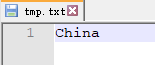
>A1.write("China") |
Overwrite tmp.txt and write string China to it:
|
|
3 |
>A1.write@a("Chinese") |
Use @a option to append string Chinese to tmp.txt:
|
|
4 |
=["China","America","England "] |
|
|
5 |
>A1.write(A4) |
Write A4’s string sequence to tmp.txt:
|
|
6 |
>A1.write(string(now())+":start") |
Simulate to compose a log using write@a function.
|
|
7 |
>A1.write@a(string(now())+":end") |
|
|
8 |
>A1.write@a(string(now())+":startPrint") |
|
|
9 |
>A1.write@a(string(now())+":endPrint") |
|
|
10 |
=file("D:/test.btx").read@b() |
Read data from a binary file and return a BLOB value. |
|
11 |
=file("D:/result.btx").write@b(A10) |
Generate result.btx using binary format data. |
|
12 |
=file("D:/employee.txt").write@w(A4) |
Use \r\n, the Windows-style line break. |

Related function: