Invoking DQL in Java applications
Using the Java language as an example, this subsection is a quick guide to connection to DQL through JDBC.
There are two methods to establish a connection to DQL through JDBC:
Method 1: Deploy and start DQL Server. The process is displayed in Deploying DQL server. Below is the code example:
public void DQLServerJDBC() {
Connection con=null;
try {
// Establish a connection
Class.forName("com.esproc.dql.jdbc.DQLDriver");
con = DriverManager.getConnection("jdbc:esproc:dql:// 127.0.0.1:3368/datalogic","sa","sa");
// Create and execute DQL statement
PreparedStatement stmt = con.prepareStatement("SELECT EmpID,Name FROM Employee", ResultSet.TYPE_SCROLL_INSENSITIVE, ResultSet.CONCUR_READ_ONLY);
ResultSet set = stmt.executeQuery();
…….
} catch (SQLException e){
System.out.println(e);
}finally{
// Close data set
if (con!=null) con.close();
}
}
Method 2: Embedded DQL JDBC. The process is explained in Embedded DQL deployment.
The following shows how to achieve user privilege control using character, visual file and macro file:
Use demo.glmd to generate the visual file oeid.gvsb, and set “conditional visibility” for Orders table:
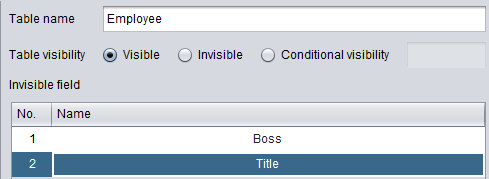
The content of macro deployment file (macro.json):
{"user1":{"EmployeeID":"1"},"user2":{"EmployeeID":"2"}}
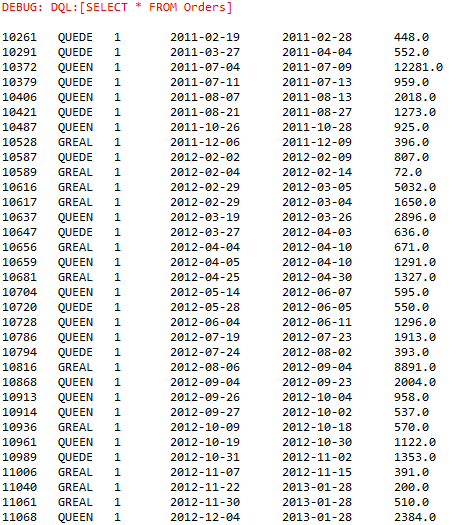
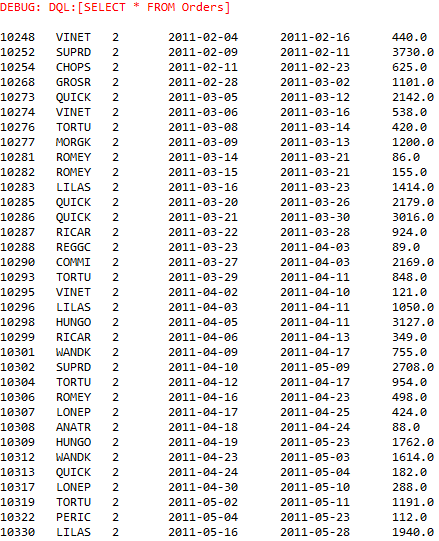
The above JSON string means that, when user named user logs in, parameter EmployeeID=1 will be passed in through the macro; and when user named user2 logs in, parameter EmployeeID=2 will be passed in through the macro.
Below is the code example:
public void DQLJDBC() {
Connection con=null;
try {
// Establish the connection
Class.forName("com.esproc.dql.jdbc.DQLDriver");
// Related files, including configuration file and metadata file, are located in the project’s classpath
con = DriverManager.getConnection("jdbc:esproc:dql://?config=raqsoftConfig.xml&glmd=demo.glmd&gvsb=oeid.gvsb¯o=macro.json&user=1");
// Write and execute the DQL statement
PreparedStatement stmt = con.prepareStatement("SELECT * FROM Orders", ResultSet.TYPE_SCROLL_INSENSITIVE, ResultSet.CONCUR_READ_ONLY);
ResultSet set = stmt.executeQuery();
…….
} catch (SQLException e){
System.out.println(e);
}finally{
// Close the dataset
if (con!=null) con.close();
}
Use character user1, execute the code, and return result:
Use character user2, modify url as jdbc:esproc:dql://?config=raqsoftConfig.xml&glmd=demo.glmd&gvsb=oeid.gvsb¯o=macro.json&user=2, execute the code and return result:
The macro definition file on the DQL server can be also modified by executing the ‘set macro’ command. Specific operations are explained in dynamic modification of macro.