Overview
In order to increase performance and reduce space usage, we usually adopt certain storage mechanisms for physical tables. But they usually lead to lower data readability and higher usage complexity. For example, using integers to represent enumerated values or using bits of an integer field to store boolean values. Integers and binary digits are not as easy and intuitive to read as strings and Booleans, and we need to perform extra operations, such as type and base conversions. In this case, pseudo tables are the better choice.
A pseudo table isn’t a fact table. It is a logical table defined based on a physical table. We can define easier to use logical fields in a pseudo table. Such logical fields are called pseudo fields, and fields that physically exist in a physical table are called real fields.
Through mapping between the pseudo fields and the real fields, a pseudo table encapsulates the special storage structure and achieves storage transparency for the physical table. This helps reduce hard disk usage and increase performance, as well as making data easier to read and handle.
If you are do not familiar with SPL, it’s a little difficult to define a pseudo table in esProc. But Metadata Editor’s pseudo table definition functionality makes it convenient to define a pseudo table before you learn to use SPL well.
In A quick guide: Step2: Define a pseudo table, we explained how to quickly define a pseudo table based on a composite table. You can also define a pseudo table based on a bin file (.btx). To implement this, set primary key for the bin file under BTX primary key. If there are multiple primary key fields, separate them with the comma. Following shows the directions:
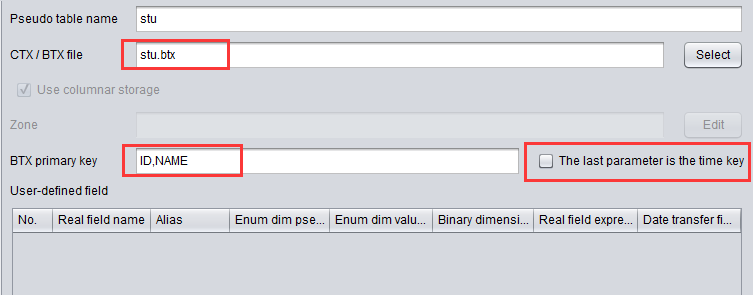
Check 【The last parameter is the time key】 to set the last parameter under BTX primary key as the time key.
We’ll illustrate how to define complex pseudo tables using Metadata Editor and applications of defined pseudo tables.