Pseudo Table
The functionalities explained in this section only appear in esProc Enterprise Edition, users who use the other editions just skip it.
We can use data in a composite table by not only accessing it directly but by defining a pseudo table. A pseudo table is not a physical table but one that retrieves data from an existing composite table according to the current definition. Now pseudo tables are supported in esProc Enterprise edition only.
Basic uses
For the convenience of illustration, we first generate three composite tables. The employee table consisting of fields of employee ID, department ID, gender, marital status and name, among which gender and marital status are stored together in one field named Bools. Both of the other two tables store orders in fields of salespeople ID, order code, datetime and amount. Below is the code for generating the composite tables:
|
|
A |
B |
|
1 |
=demo.query("select NAME, SURNAME, GENDER, STATE from employee") |
|
|
2 |
=A1.select(GENDER=="M") |
=A1\A2 |
|
3 |
=A2.(NAME).id() |
=A3.len() |
|
4 |
=B2.(NAME).id() |
=A4.len() |
|
5 |
=A1.(SURNAME).id() |
=A5.len() |
|
6 |
=A1.(STATE).id() |
=A6.len() |
|
7 |
[Sales,Technology,R&D,Financial,Admin] |
[0,0.5,0.75,0.9,0.97,1] |
|
8 |
=to(1000).new(#:EID, B7.pseg(rand()):DeptID, if(rand()<0.5,0,1):Gender, if(rand()>0.8,1,0):Married, if(Gender==0,A3(rand(B3)+1), A4(rand(B4)+1))/" "/A5(rand(B5)+1):Name, bits(Gender, Married):Bools ) |
>file("pseudo/emps.btx ").export@b(A8) |
|
9 |
=A8.select(DeptID==1) |
=A9.len() |
|
10 |
2024-01-01 |
2025-01-01 |
|
11 |
=periods@x(A10,B10) |
=periods@x(B10,elapse@y(B10,1)) |
|
12 |
=A11.((a=string(~,"yyMMdd"), to(rand(100)+ 10).new(A9 if(rand()>0.9, (rand(B9)+1, rand(B9-20)+ 21)).EID:SID, a/string(#, "0000"):OID, datetime(A11.~, time(rand(8)+8, rand(60), 0)):OTime, rand(100)*10+200:Amount))).conj().sort(SID, OID) |
|
|
13 |
=B11.((a=string(~,"yyMMdd"), to(rand(100)+ 10).new(A9 if(rand()>0.9, (rand(B9)+1, rand(B9-20)+ 21)).EID:SID, a/string(#, "0000"):OID, datetime(B11.~, time(rand(8)+8, rand(60), 0)):OTime, rand(100)*10+200:Amount))).conj().sort(SID, OID) |
|
|
14 |
=file("pseudo/emps.ctx") |
=A14.create(#EID,DeptID,Gender, Married, Name, Bools) |
|
15 |
|
>B14.append@i(A8.cursor()) |
|
16 |
=file("pseudo/1.orders.ctx") |
=file("pseudo/2.orders.ctx") |
|
17 |
=A16.create(SID, #OID, OTime, Amount) |
>A17.append(A12.cursor()) |
|
18 |
=B16.create(SID, #OID, OTime, Amount) |
>A18.append(A13.cursor()) |
|
19 |
>B14.close() |
|
|
20 |
>A17.close() |
>A18.close() |
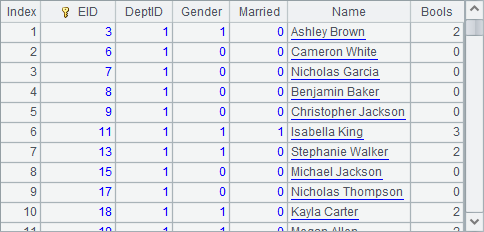
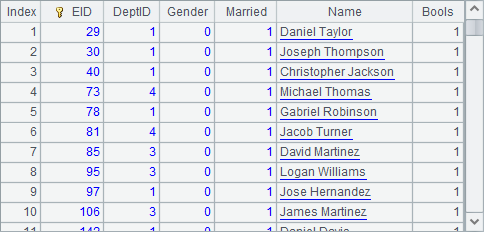
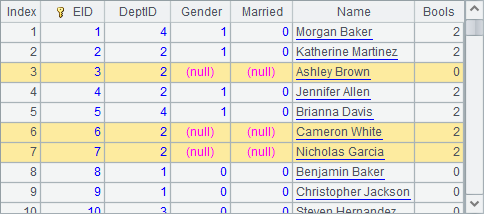
The given data is of small size. In Gender field, 0 represents male and 1 represents female; and in Married field, 0 means unmarried and 1 means married. A8 generates employee data as follows:
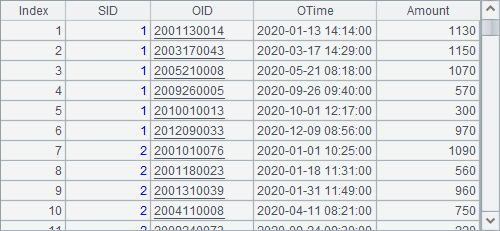
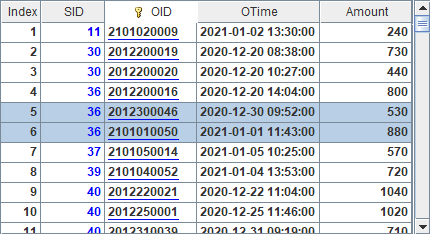
Below shows data in orders tables in the years 2024 and 2025 A12 and A13 generate respectively:
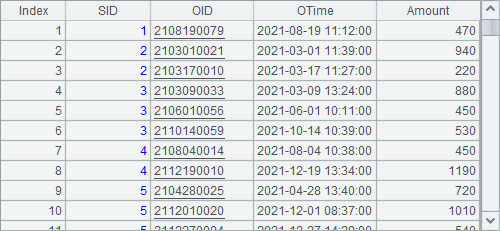

The three tables are stored in three composite table files – emps.ctx, 1.orders.ctx and 2.orders.ctx in the pseudo path and bin file emps.btx. The last two composite table files form a multi-zone composite table. And we’ll take them as examples to look at how to define and use pseudo tables. Now we backup them in case data is modified later during the testing.
|
|
A |
B |
C |
|
1 |
=create(file).record(["pseudo/emps.ctx"]) |
=pseudo(A1) |
=B1.cursor().fetch@x(100) |
|
2 |
=create(file, zone).record(["pseudo/orders.ctx", [1,2]]) |
=pseudo(A2) |
=B2.import() |
A pseudo table definition record is a table sequence’s record of specified structure. Its simplest form should include a file field to specify data source of the pseudo table. In the above code, A1 generates a pseudo table definition record as follows:

It is the best to use a composite table file (ctx) as the source of data in a pseudo table.
Based on the above record, we use pseudo(pd) function to officially define a pseudo table. Parameter pd is the pseudo table definition record. B1 generates a pseudo table definition:
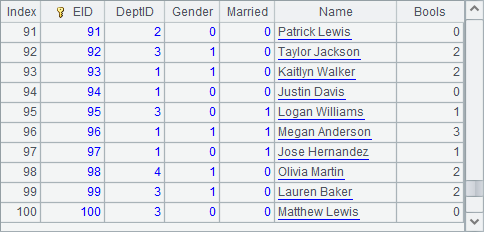
Like a composite table file, a pseudo table definition feeds data using T.cursor() function that generates a cursor or T.import() function that retrieves all data. C1 retreives the first 100 records using the cursor:

A pseudo table can also be generated from a multi-zone composite table file. A2 in the above code generates a pseudo table definition as follows:
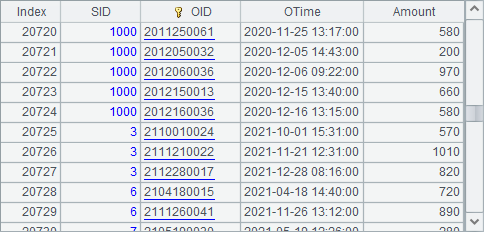
C2 retrieves data from this pseudo table:

Data is retrieved from the multi-zone composite table file in the original order.
We can use delete/update/append functions to delete, update or add one or more record from/in/to a pseudo table. The action will directly entail a corresponding change in the source composite table file. For example:
|
|
A |
B |
|
1 |
=create(file).record(["pseudo/emps.ctx"]) |
=pseudo(A1) |
|
2 |
=B1.select(DeptID==2 && EID<10) |
=A2.import() |
|
3 |
>B2.run(DeptID=0) |
=B1.update(B2) |
|
4 |
=B1.import() |
=A2.import() |
|
5 |
>B2.run(DeptID=2, EID=EID+1000) |
=B1.update(B2) |
|
6 |
=B1.import() |
|
Like using a composite table, we can select certain records from a pseudo table through the T.select() function. In the above code, A2 selects employee records where DeptID is 2 and EID is less than 10, and B2 retrieves them using the T.import() function, as shown below:
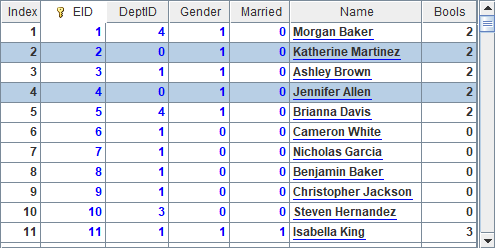
A3 resets values of DeptID field of the selected employee records as 0, and B3 updates these modified records stored in record sequence P to the pseudo table using T.update(P) function. Keep in mind that, when you use update function to update a pseudo table, you must first define a dimension for the corresponding composite table, because all these operations are performed based on the composite table’s dimension. With the modification, A4 and B4 get the following results:

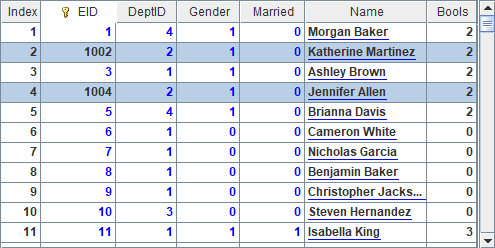
We can see that corresponding records are modified. Now as no records can meet the filtering conditions specified in A2, the record sequence returned by B4 is empty.
A5 changes DeptID values of B2’s two records to their original values and adds 1000 to each EID value. B5 uses T.update() function to update the change to the pseudo table. Below is A6’s result:
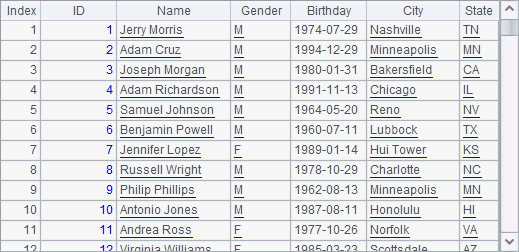
If primary key values in the records are updated, dimension of the composite table containing these records cannot remain ordered and the pseudo table cannot be updated as expected.
We can also generate a pseudo table from one or more bin files using the same way of generating one from composite table. For example:
|
|
A |
B |
|
1 |
=create(file).record(["pseudo/emps.btx"]) |
=pseudo(A1) |
|
2 |
=B1.cursor().fetch@x(100) |
|
|
3 |
=B1.select(like(Name, "*Smith")) |
=A3.import() |
A2 uses the cursor to access B1’s pseudo table and returns the following result:
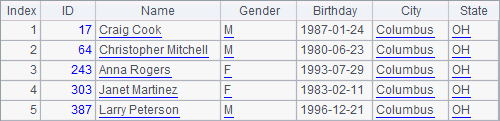
A3 selects records of employees whose last name is Smith. B3 imports records from A3 and returns result as follows:

A bin file-generated pseudo table cannot be used in the same way as a multi-zone composite table.
Pseudo table merge
Usually, data is stored and used by user in a multi-zone composite table file, such as the orders records stored by salespeople in the previous section., and will be grouped by the first field. For example:
|
|
A |
|
1 |
=create(file,zone).record(["pseudo/orders.ctx", [1,2]]) |
|
2 |
=pseudo(A1) |
|
3 |
=A2.import() |
|
4 |
=A2.group(year(OTime)).import() |
|
5 |
=A4.new(year(OTime):Year,~.sum(Amount):Total) |
|
6 |
=A2.groups(SID, year(OTime):Year;~.sum(Amount):Total) |
A1 generates a pseudo table definition record:
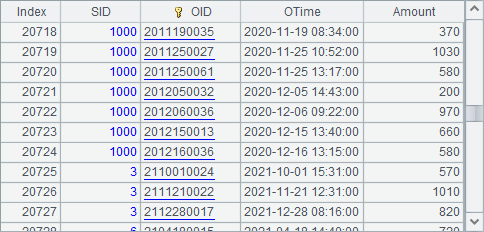
And data is retrieved from the multi-zone composite table file by zone tables in order. A3 imports data from the pseudo table as follows, which has been displayed in the previous section:
A4 groups the pseudo table by year:

Data is grouped by the specified field or expression. Summing amounts in A5 based on the grouped pseudo table can make this easy to understand, and below is the result:

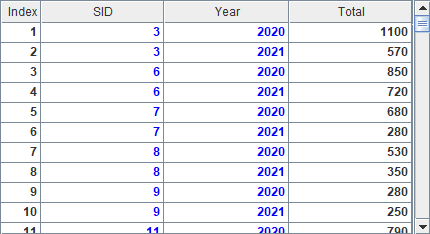
We can also use T.groups() function to perform the above grouping and sum operation. Note that this method groups data by two layers of fields – SID and order year. Here’s A6’s result:
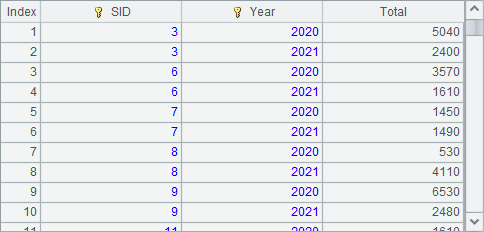
As can be seen from the previous example, data is retrieved from zone tables of the multi-zone composite table by the first field segment by segment and then merged to get result. But at times segmenting data by the first field leaves unevenly distributed data or generates groups containing relatively small data. In the previous example, the number of order records of the first 20 salespeople is small and that of the other salespeople is not large. In such cases, the merge operation is likely to frequently switch between zone tables for retrieving data because each segment contains relatively small data or there are too many segments, resulting in low efficiency of retrieving data from each zone table. In order to improve the situation, we can restructure data by setting “larger” groups on the first field in an effort to get higher efficiency. For example:
|
|
A |
B |
|
1 |
=demo.query("select distinct(NAME) from CITIES") |
=A1.(NAME) |
|
2 |
=create(file,zone).record(["pseudo/orders.ctx", [1]]) |
=pseudo(A2).import() |
|
3 |
=create(file,zone).record(["pseudo/orders.ctx", [2]]) |
=pseudo(A3).import() |
|
4 |
=B1.len() |
=1000.(B1(rand(A4)+1)) |
|
5 |
=B2.new(B4(SID):City, SID, OID, OTime, Amount) |
=B3.new(B4(SID):City, SID, OID, OTime, Amount) |
|
6 |
=A5.sort(City) |
=B5.sort(City) |
|
7 |
=file("pseudo/1.orders2.ctx") |
=file("pseudo/2.orders2.ctx") |
|
8 |
=A7.create(City, SID, #OID, OTime, Amount) |
>A8.append(A6.cursor()) |
|
9 |
=B7.create(City, SID, #OID, OTime, Amount) |
>A9.append(B6.cursor()) |
The original order data does not contain city data (City), but the above testing data adds City information for the salespeople, sorts data by City, SID and OID in order and stores data in multi-zone composite table orders2.ctx. In real-world situations, a first field by which data will be first grouped can contain cities people come from, departments employees work in, transaction type codes, banks via which orders are paid, etc. Data should be arranged by the first field.
Now we perform a query using pseudo table orders2.ctx:
|
|
A |
B |
|
1 |
=create(file,zone, date).record(["pseudo/orders2.ctx", [1,2], "OTime"]) |
=pseudo(A1).import() |
A1’s pseudo table gets data from the multi-zone composite table and merges them by the first field. Here’s B1’s result:

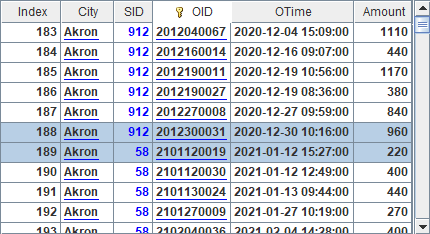
The retrieved data is merged by the multi-zone composite table’s first field City, during which records of two years of same city will be put together but won’t be sorted by seller ID.
User-defined fields
Apart from using fields of the original data tables, we can define fields through adding column field in the pseudo table definition record. For example:
|
|
A |
|
1 |
[Sales,Technology,R&D,Financial,Admin] |
|
2 |
=create(name,enum,list).record(["DeptID","Dept",A1]) |
|
3 |
=create(name,bits).record(["Bools",["IfMarried","IfLady"]]) |
|
4 |
=create(file,column).record(["pseudo/emps.ctx",A2|A3]) |
|
5 |
=pseudo(A4) |
|
6 |
=A5.select(Dept=="Sales").import() |
|
7 |
=A5.import(EID, Name, DeptID, Dept) |
|
8 |
=A5.select(!IfLady && IfMarried).import() |
|
9 |
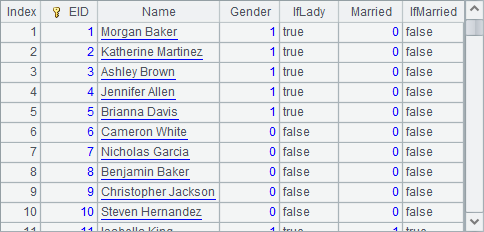
=A5.import(EID, Name, Gender, IfLady,Married,IfMarried) |
Two fields are defined in the above code. A2 defines a Dept field:
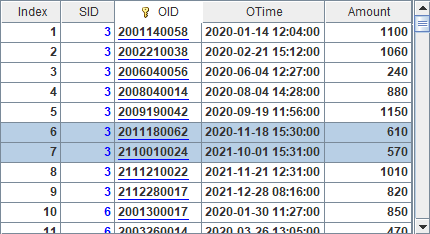
In the column definition record, name is a field name. When it is a field in the original data table, it is a real field. It also can be a pseudo field generated from a real field. If values of the real field DeptID need to be transformed into corresponding department names, we call such a pseudo field enumerated pseudo field. In the column definition record again, we define enumerated pseudo field name through the enum field. The transformation converts department IDs into corresponding values in a specified sequence, which is configured under list field, by matching IDs to values of the sequence. The matching begins from place 1.
A3 defines another field. In the original data table, Bools field stores data of two binary fields – Gender and Married. Below is A3’s column definition record:
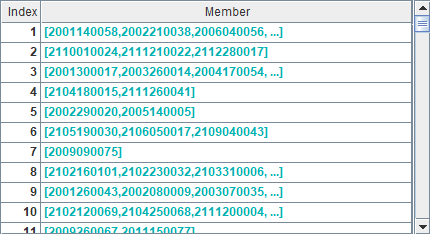
The binary field that corresponds to each bit will be retrieved according to the definition. The pseudo fields under Bools field are called binary dimension pseudo fields. Their names are defined through bits field in the column definition record. Pseudo field names cannot be same as original fields, we use new names IfMarried and IfLady. The definition arranges fields under Bools from low order to high order. Values of each field are bool value true or false. A binary dimension pseudo field can store 32 binary fields at most.
A4 defines a pseudo table by setting data source (file field) and column definitions (column field):
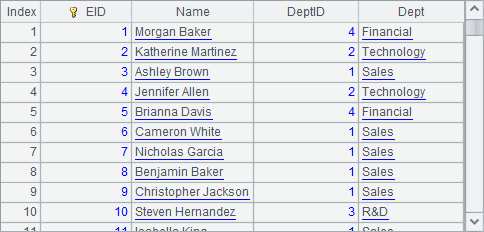
A5 generates a pseudo table according to A4’s definition. The previously defined column field will play its part for getting data for the pseudo table. A6 selects employees in Sales department using the enumerated pseudo field Dept:
Here T.import() function retrieves records from the pseudo table and returns only the original fields by excluding the pseudo fields. Yet the selection according to the pseudo field is successful as the DeptID for all employees is 1.
In order to return a pseudo field, we need to specify the desired fields in T.import() function. A7, for instance, returns the following query result:
The result set shows clearly the correspondence between values of the enumerated pseudo field and those of the corresponding real field.
A8 performs the filtering operation to retrieve records of married male employees using the binary dimension pseudo field and return the following result:

A query on binary dimension pseudo field needs to specify the column names. Below is A9’s result:

We can also use update function to update a pseudo table using user-defined fields:
|
|
A |
|
1 |
[Sales,Technology,R&D,Financial,Admin] |
|
2 |
=create(name,enum,list).record(["DeptID","Dept",A1]) |
|
3 |
=create(name,bits).record(["Bools",["IfMarried","IfLady"]]) |
|
4 |
=create(file,column).record(["pseudo/emps.ctx",A2|A3]) |
|
5 |
=pseudo(A4) |
|
6 |
=A5.select(EID<8) |
|
7 |
=A6.select(Dept=="Sales").import(EID,Name,Dept,IfMarried,IfLady) |
|
8 |
>A7.run(Dept="Technology", IfLady=!IfLady) |
|
9 |
>A5.update(A7) |
|
10 |
=A5.import(EID,Name,Dept,IfMarried,IfLady) |
|
11 |
=A5.import() |
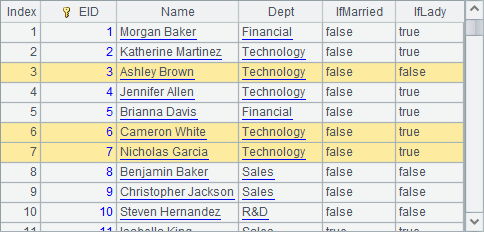
A5’s pseudo table uses an enumerated pseudo field and a binary dimension pseudo field. A7 selects sales department employee records where EID is less than 8 and gets the following result:

A8 modifies their departments and genders, as well as executes the update. A10 retrieves records from the updated pseudo table. Note that Dept field and IfLady field of the two records have been changed after update in the following A10’s result:
We can check in A11 the new data after modification in the composite table file the pseudo table is using:
The update automatically calculates the actual data according to the current values when trying to change values in a pseudo table’s pseudo field, and updates the data to the corresponding composite table. As the update action is based on Bools instead of Gender and Married fields used for look-up, their values become null after the update.
At times a field in the original data table associates with records of another table. The field is thus called foreign key column. Besides enumerated pseudo field, you can use a regular pseudo field in the original data table, for instance:
|
|
A |
|
1 |
=create(name,alias,exp).record(["OTime",["OYear"],"year(OTime)"]) |
|
2 |
=create(file,zone,column).record(["pseudo/orders.ctx",[1],A1]) |
|
3 |
=pseudo(A2) |
|
4 |
=A3.import(SID, OTime, OYear, Amount) |
A1 adds a user-defined field:
OYear is a pseudo field computed from real field OTime. In column definition record, we define a real field under name field, define pseudo field name under alias field, and define expression under exp field.
A2 generates a pseudo table definition record:
A4 imports data from A3’s pseudo table. In the following result, pseudo field OYear is displayed:

If pseudo field name isn’t used for defining the pseudo table, A1’s statement is =create(name,exp).record(["OTime","year(OTime)"]). The computation directly uses the expression result to replace real field value. Now A4 returns the following result set:
A pseudo table can be generated from in-memory table sequence, in-memory table and cluster in-memory table, too. With these source tables, definition of the pseudo table structure uses a var field to specify name of the variable stored in the in-memory table rather than using the file field to specify the source file name. For example:
|
|
A |
|
1 |
>tab=demo.query("select * from CITIES") |
|
2 |
=create(var).record(["tab"]) |
|
3 |
=pseudo(A2) |
|
4 |
=A3.select(STATEID==3) |
|
5 |
=A4.import() |
A1 retrieves CITIES table from the database and stores the result table sequence in variable tab. A2 defines a pseudo table using an in-memory table. A4 gets information of cities whose STATEID is 3. A5 imports the selected data as follows:
A pseudo table defined based on an in-memory table has same uses as any other pseudo tables.